Integration Testing Before Main: A Practical Sprint Git Flow
A Sprint Git branching workflow that has worked well in our team: its rationale, operating steps, comparison with common models, and limits.
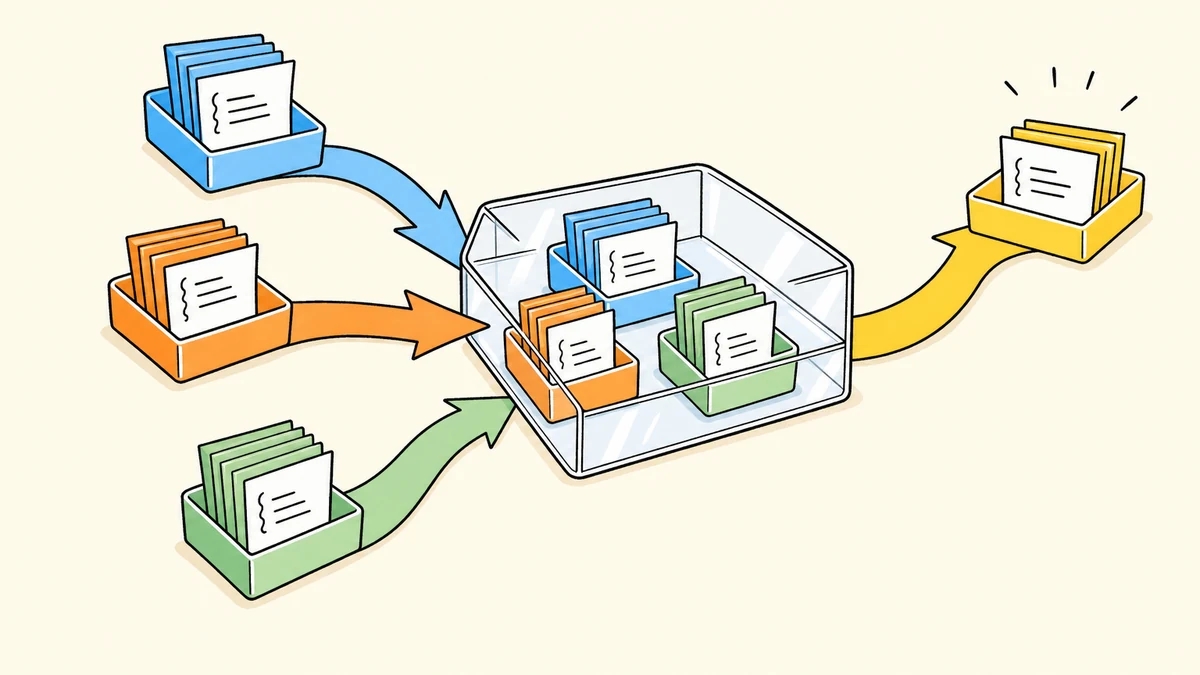
Branch changes from main, test them together, and release each when it is ready. This flow has worked well in our team. It suits small teams that share testing infrastructure but release changes in separate batches; it is not a standard Git workflow. This article calls the production baseline branch main. Some repositories still call it master; both names refer to the same role here.
Case 1: The feature is unfinished, but the bug needs fixing first
Consider a hypothetical situation. You are building report export while a colleague changes the query API. Both changes work on their own branches, but together the export fails because the query response format changed. Investigation also reveals an older bug that must be fixed first. Meanwhile, develop already contains other colleagues’ features that have not passed acceptance.
We want to release the fix without releasing those unfinished features. The key is to branch the fix from main: it can join the shared testing combination while retaining its own delivery boundary. The “Urgent fix” scenario below shows how the test combination and production version stay separate.
Case 2: AI works in parallel; releases follow acceptance order
Now imagine two agents working on export A and query B. A started later but passes acceptance first; B is still being debugged. Once we confirm that A does not depend on B, A can enter the release process first. Start with “Normal feature” below, then switch to “Urgent fix” to revisit Case 1. Both scenarios use the same A/B roles.
Finished code is not permission to release. People and AI release according to validation results and dependencies, not task start order. Working directories can be independent, but access to a shared test environment still needs coordination, and test results belong to a specific version.
Explore: separate the test combination from the release combination
Branches organize code; environments run explicit versions. main is the production-candidate baseline, development branches hold individual changes, and develop combines them for testing. A Sprint is an agreed development period, after which the team coordinates rebuilding that test combination.
An MR is a merge request, called a PR on GitHub, used to review and merge code. A tag marks a fixed version. The automated pipeline, or CI, builds candidate code into a deployable package or image: a build artifact. Here, gray is a pre-release validation environment, usually without a permanent corresponding branch. Production runs the same artifact that passed gray validation.
First, make a prediction: if A + B pass testing together, does releasing A alone still require validation? Click “Next” and compare the “Code” and “Runtime” states: one shows branch contents, the other shows the versions actually running in each environment. Pause playback at any time. Switching scenarios resets to that scenario’s starting point.
Open the scenario demo full screen
Static main path, also available when the interaction cannot load
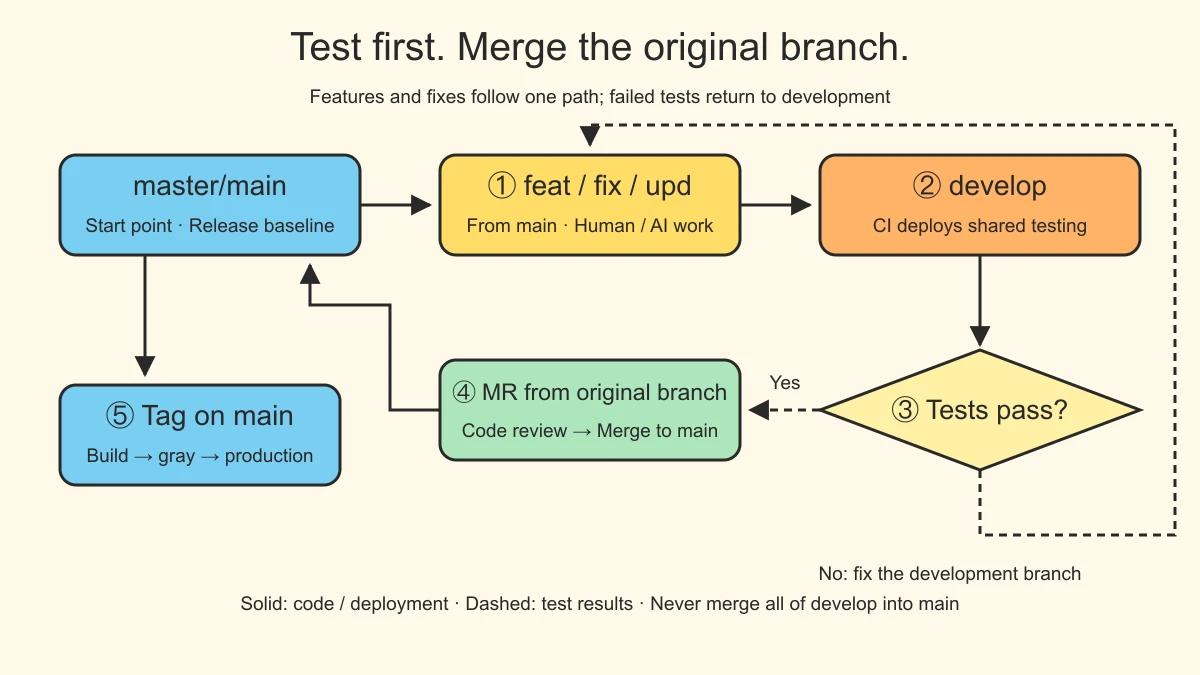
A passing combined test does not prove every subset is releasable. The original branch returns to main after dependency checks and review; the final candidate still passes gray validation before the same artifact is deployed to production.
The scenario demo uses deterministic HTML animation. Version identifiers are teaching examples; it executes no real Git or deployment operations. Start with “Normal feature,” then explore “Test failure,” “Urgent fix,” “Gray failure,” or “Sprint rebuild” when needed. The table below provides a quick reference; expand the later sections for commands and recovery procedures.
| Step | Code movement | Environment and release condition |
|---|---|---|
| ① Develop | Create feat / fix / upd from main | Include only the intended change; do not push routine work directly to main |
| ② Integrate | Merge the development branch into develop | CI deploys the shared test environment; develop represents only the current test combination |
| ③ Test | Fix failures on the original development branch | Merge, deploy, and test again; coordinate removal of a failing combination or rebuild develop if necessary; bind results to the exact version |
| ④ Merge | Open an MR from the original development branch to main | Tests, dependency checks, and code review pass; conflict fixes must return to the original branch and be revalidated |
| ⑤ Release | Tag the candidate commit on main; CI builds it | Validate the tag’s artifact in gray, deploy that same artifact to production, and check runtime behavior |
We currently manage releases with main + tags, without requiring another permanent gray branch. Gray is a pre-release validation environment and must validate this release’s actual candidate. A tag does not automatically exclude other features already merged into main.
Four boundaries that prevent misuse
- A change with unready dependencies cannot ship alone. Working together on develop does not prove that either change works independently.
- Do not directly rewrite shared branch history. Routine changes enter
mainthrough development branches and MRs. Only merge-conflict handling may require temporary corrections ondevelop; those fixes must also reach the relevant development branches and be revalidated. Undo a mistaken merge with a revert on a repair branch and an MR, not by force-pushing shared history backward. - Multiple agents must not overwrite the test environment independently. Coordinate deployment windows and reconfirm test results whenever the environment’s version changes.
- Before rebuilding develop from main at Sprint end, inventory unfinished branches and necessary fixes. Retain unfinished branches, merge them into the new test combination when appropriate, and test again.
The main difference from classic GitFlow is that regular features also branch from main. develop is only a test combination and is never merged back wholesale. Accepted development branches can return individually to main, followed by a tagged candidate release. Classic GitFlow also supports hotfixes. GitHub Flow emphasizes individual changes returning directly through PRs, while AoneFlow is better suited to assembling selected features into release batches.
That completes the main path from individual change through combined testing to candidate release. The comparisons and operating details below are references to consult as needed.
How other teams work: four common models compared
Expand the five-model positioning diagram and comparison table
Start with how the team works. The horizontal axis describes iteration organization, from independently progressing individual changes to coordinating multiple features within a Sprint or batch. The vertical axis describes release cadence, from fixed release windows to releasing promptly when ready.
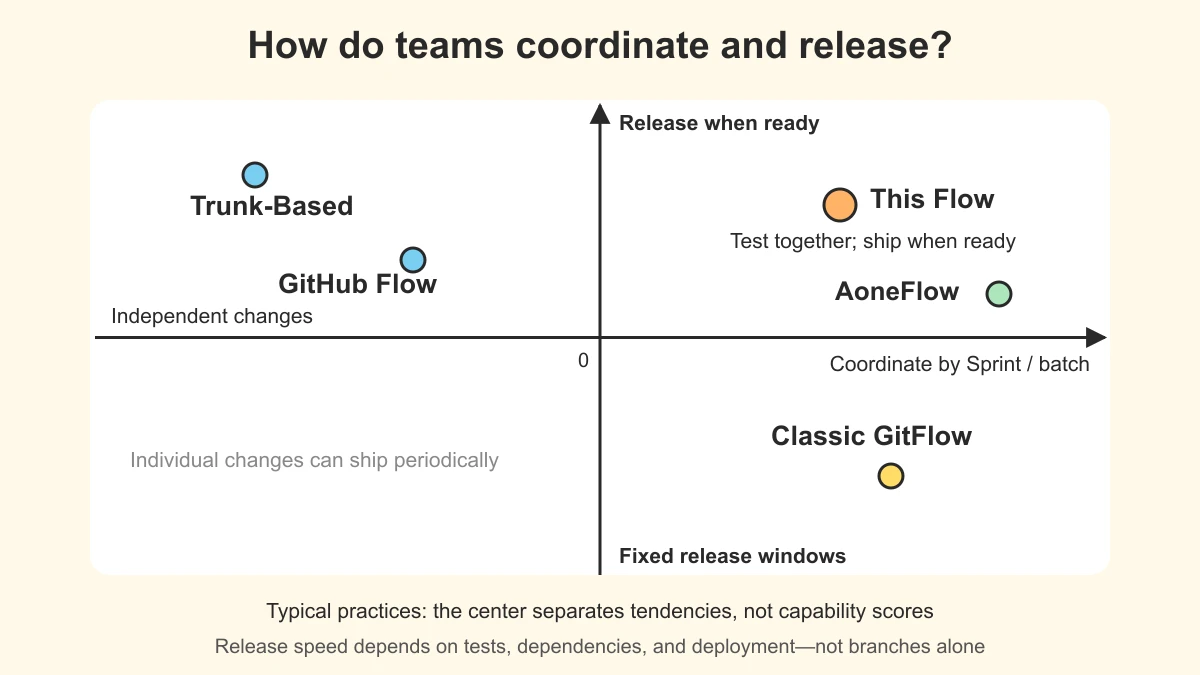
The five points represent typical practices. The center separates tendencies; it is not a zero score for capability. Our target is the upper right: people test together within an iteration, while a fix need not wait until the iteration ends. AoneFlow progresses selected combinations; classic GitFlow often accompanies release windows. Trunk-Based Development and GitHub Flow commonly support small deliveries, but can also release periodically. Actual responsiveness depends on tests, dependencies, and deployment capability. A branching model cannot guarantee release speed.
| Model | Main code path | Best considered when | Main cost |
|---|---|---|---|
| Trunk-Based | Small changes enter main frequently, optionally through short-lived branches | Changes can stay small and automated feedback is fast | Keeping main usable continuously and managing incomplete features |
| GitHub Flow | Main → feature branch → PR checks and review → main | Lightweight collaboration around individual changes | Arranging combination testing for several unmerged features separately |
| Classic GitFlow | Develop → feature → develop → release → production main; fixes flow back to develop | Release preparation is a distinct phase and production needs maintenance | Maintaining development and release lines and propagating fixes |
| AoneFlow | Main → feature branches; selected features join a release branch, which returns to main after release | Features are assembled into batches with managed validation environments | Maintaining feature combinations, release branches, and fix propagation |
| This Sprint Flow | Main → development branch → develop testing; original branches return individually by MR → tag → gray → production | A shared test environment serves features and fixes that need separate releases | Test and release combinations may differ, requiring final-candidate validation |
Our aim is to find integration problems early on a shared branch while preserving the ability to branch from main and release in separate batches. This reduces release coupling; it does not remove dependency checks or candidate validation.
Classic GitFlow also has a hotfix path from main. AoneFlow can aggregate all features for a Sprint. The deciding factor is not team size or a model’s name, but which unit of validation and release matches the team’s work. First-party descriptions appear in the references.
Where this flow fits
This flow suits teams that test together but need to release features and fixes separately. It assumes CI can deploy branches to a shared test environment, someone coordinates environment access, candidates can be built from main tags and deployed to gray, and versions can be linked to validation records. The costs are an additional integration step, shared-environment coordination, and periodic rebuilding. Do not adopt it unchanged if you already have stable continuous delivery, need complex maintenance of multiple versions, or lack these prerequisites.
Operating reference: expand when needed
Release and rollback: tags, gray, the same artifact, and production checks
For a small team with one main line and one release batch progressing at a time, begin with this path:
- Validate the development branch in the test environment associated with
develop, complete review, and merge it intomainthrough an MR. - The release owner checks the candidate commit, feature list, and dependencies, then creates a unique tag on that
maincommit to trigger the CI build. - Deploy that tag’s artifact to gray and validate the exact combination intended for release.
- After gray passes, deploy the same build artifact to production and check actual runtime behavior.
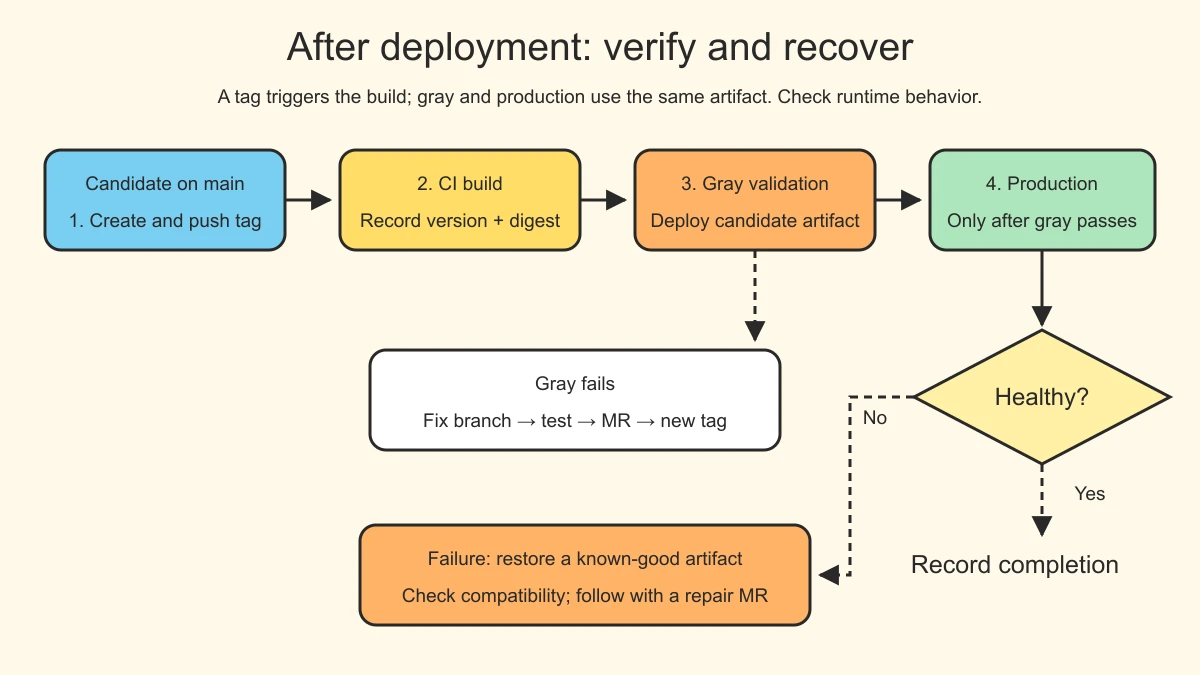
Main can continue changing while the selected release version remains fixed. After gray validation, production should deploy the same build artifact, not rebuild the latest main.
Inject environment configuration separately and still check dependency and data differences between gray and production. Identical code does not make the environments equivalent. Record the tag, commit, artifact digest, and each environment’s deployment record so the tested version can be matched to the deployed one.
For example, v1.2.3 labels a candidate; creating the tag does not mean it is already live. If gray reveals a defect, create a repair branch from main, test it, and merge through an MR. Select the new commit, create a new tag, rebuild, and validate again. Do not move the old tag or let production rebuild the latest main in place of the validated artifact.
Versions and rollback
v1.2.3 is only an example; use your repository’s versioning convention rather than copying it literally. Under Semantic Versioning, PATCH covers backward-compatible bug fixes, MINOR covers backward-compatible functionality, and MAJOR covers incompatible public API changes. A large change is not automatically a MAJOR release.
Rollback restores a known-good build artifact, not whichever tag happens to precede the latest one in time. Database migrations, message formats, and external side effects may not roll back with the application image; check compatibility first. After restoring the running environment, use a repair or revert MR to bring main and subsequent releases back into agreement.
Optional: what if a separate gray branch is genuinely needed?
If one batch needs extended validation while main receives the next batch, create gray/<batch> from the selected main commit and bind it to the gray environment. It stabilizes only that batch. It is not a starting point for routine development and must not import all of develop. At any moment, a shared gray environment must have a clearly identified owning batch.
| Stage | Branch operation | Environment and validation |
|---|---|---|
| Establish the batch | Branch gray/<batch> from the selected main commit | CI deploys gray; record the commit and batch contents |
| Find a defect | Create a repair branch from the batch and merge it back into gray after review | Validate the fix in testing and propagate it back to main |
| Prepare release | Incorporate gray’s stabilized result into main through an MR | Confirm the final main candidate matches what was tested |
| Release | Create a new tag on the final main commit and build | Validate the final artifact in gray before promoting it to production |
A gray branch stabilizes a batch; it does not automatically exclude features later added to main. If the final main combination changes, it must pass gray validation again.
This is why main + tags is the default: one fewer permanent branch and less fix propagation and combination management. If several production versions truly need concurrent maintenance, design separate release-maintenance lines instead of forcing this simplified workflow to fit.
Operating example: branches, testing, MRs, and iteration cleanup
After the older bug has been fixed and released separately, return to the export feature. It follows the same path: develop from main, enter testing, return to main when ready, and release in a batch.
The commands below illustrate one feature branch’s operations. They are not a script to paste and execute in full. Check git status and save uncommitted work first. The team is assumed to have created develop and configured test deployment. Replace example filenames and commit identifiers with actual values.
Sprint start: create a clean integration point
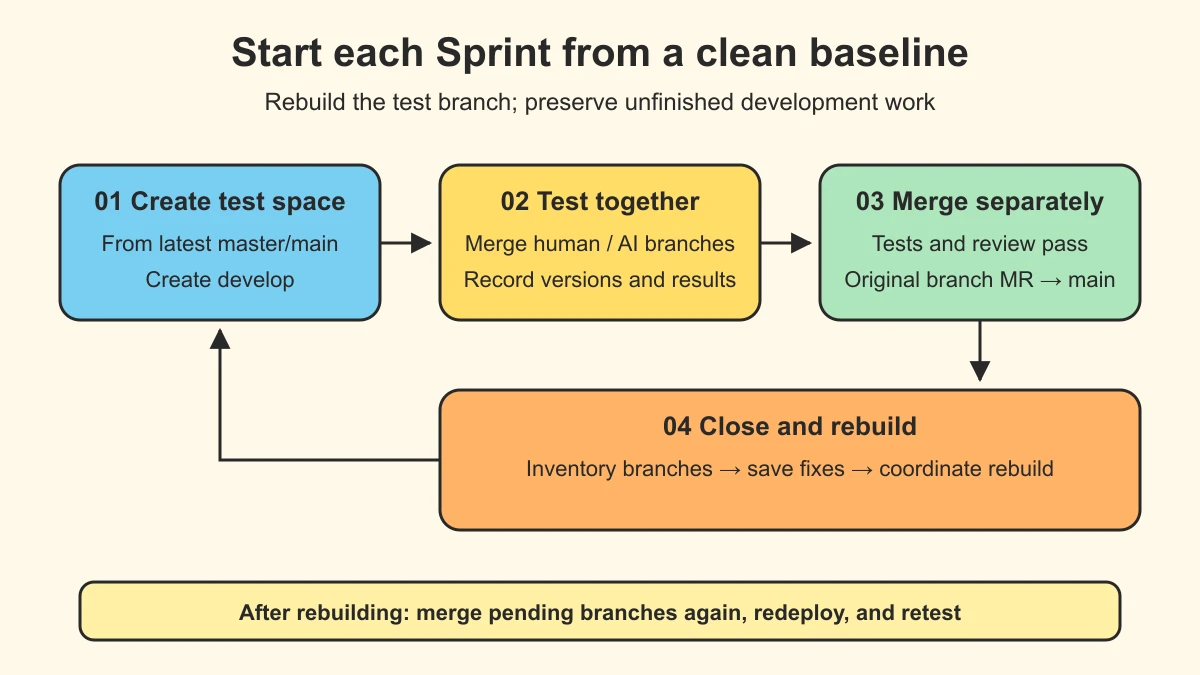
Create develop from the latest main at Sprint start. Its lifecycle follows the Sprint: rebuild it at the end rather than retaining it indefinitely.
Suppose the export feature reached main in the previous Sprint, but the query change was delayed. Reusing the old develop means the next round of testing still includes that unreleased query change by default. Rebuilding from main retains the released export feature, while the query branch rejoins only if needed in the new Sprint. The test environment’s contents become explicit again. A maintainer performs this during an agreed window: notify the team, inventory unfinished branches, create the new develop from the latest main, and tell developers to merge and deploy again. Do not push an old local develop back to the remote.
Development: every branch starts from main
This example starts by creating the branch. If the export branch already exists, return to it and synchronize with the latest main, skipping creation. See “Main has changed” below for synchronization.
1
2
3
git switch main
git pull --ff-only origin main
git switch -c feat/export-report
Names express the type and topic of the change, such as feat/checkout-summary or fix/race-condition. They do not contain a person’s name or vague prefixes such as wip and test that fail to express intent.
feat/ means a new feature, fix/ a defect repair, and upd/ a non-defect enhancement or adjustment. These are our conventions, not requirements imposed by Git.
Commit and push normally during development:
1
2
3
git add <files>
git commit -m "feat: add export preview"
git push -u origin feat/export-report
Commit messages can follow the type: description structure of Conventional Commits, using types such as feat, fix, refactor, docs, and chore. Make the subject clear. Bodies and footers remain useful for rationale, compatibility, and breaking changes; there is no need to restrict every message to a subject line.
Integration: merge into develop to validate the combination
1
2
3
4
git switch develop
git pull --ff-only origin develop
git merge feat/export-report
git push origin develop
In this workflow, pushing develop triggers CI deployment to the test environment. That is repository pipeline configuration, not a capability Git grants merely because a branch is named develop.
Test both the feature and its interactions with other changes. When something fails, first decide where the fix belongs:
| Problem | Where to fix it | Next action |
|---|---|---|
| Defect in the export feature itself | Return to the feature branch, fix, commit, and push | Merge into develop again and retest |
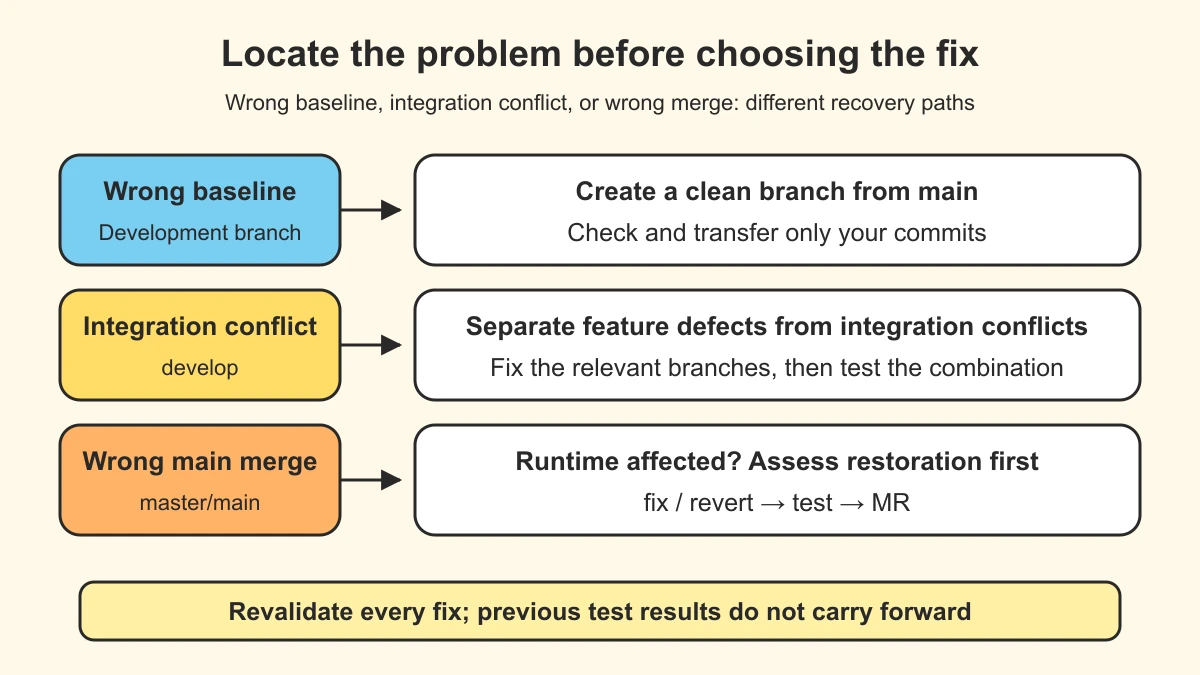
| Integration conflict between unreleased features | Fix on the relevant feature branches; a maintainer may remove the failing combination or rebuild develop if needed | Put fixes on their corresponding branches, merge again, and retest; do not merge all of develop into a feature branch |
| Conflict when merging toward main | Synchronize the feature branch with the latest main and resolve it there | Revalidate; old results no longer establish correctness |
Merge: open the MR from the development branch after testing
1
2
3
feat/export-report ── MR ──> main
          │
          └── Integration validation completed on develop
Set the MR source to feat/export-report and the target to main. After shared testing passes, dependencies are confirmed, and code review is complete, merge into main and clean up the development branch.
Merging only enters the release baseline; it is not deployment. Next, fix the candidate version, validate it in gray, and deploy to production.
Before deleting a branch, confirm the remote MR is merged and no local changes remain undelivered. git branch -d works for an ordinary merge. After a squash or rebase merge, Git may not recognize completion through commit ancestry. Verify the MR and contents rather than blindly forcing deletion when Git refuses.
Release: choose the version before choosing the environment
Our current minimal approach is master/main + tags. We do not maintain another permanent gray branch. Main receives changes ready for release, and a tag identifies the specific version. Adding a gray validation stage does not require a different branch structure.
Here, gray means a pre-release validation environment, not a gradual rollout of real production traffic.
Recovery procedures and Git command reference
After understanding the normal path, consult these cases as needed. They are not steps to repeat during every development task.
Main has changed: synchronize, do not copy develop
The development branch needs only the latest commits from main:
1
2
3
4
git fetch origin
git switch feat/export-report
git rebase origin/main
git push origin feat/export-report --force-with-lease
Use rebase only on a development branch that you exclusively own and whose history may be rewritten. For a shared branch, consider git merge origin/main. After resolving rebase conflicts, run git add <files> and git rebase --continue. If unsure, restore the starting state with git rebase --abort.
--force-with-lease checks whether the remote reference still matches the locally expected value; it does not understand whose code is whose. A background fetch may update that expectation, so this is not an absolute guarantee against overwriting work. Synchronizing main, rewriting commits, or resolving conflicts requires revalidating the candidate. Previous test records do not automatically carry forward.
A branch mistakenly started from develop: move only your commits
Do not use the whole of develop as the new branch’s baseline. Identify your commits, create a clean branch from main, and cherry-pick them:
1
2
3
4
5
6
git fetch origin
git log origin/main..wrong-branch --oneline
git switch main
git pull origin main
git switch -c feat/export-report-clean
git cherry-pick <your-commit>
That log range also lists other commits absent from main; it is not a “my commits” filter. Check contents, dependencies, and the original starting point individually. Select only this change’s commits, validate the new branch, and only then deal with the old one. Uncommitted work can first be stashed, including untracked files if necessary, then applied to the clean branch and checked before cleanup. Stash does not remove incorrect history that is already committed.
A wrong merge reached main: undo it with new commits
Do not rewrite shared main history with reset or a force push. First restore the running version under the project’s incident procedure, then use a repair branch and MR to revert the change:
1
2
3
4
5
git switch main
git pull origin main
git switch -c fix/revert-wrong-merge
git revert -m 1 <merge-commit-hash>
git push origin fix/revert-wrong-merge
The team’s release and incident procedures should define rollback timing, production permissions, and tag naming.
The -m 1 above applies only to a merge commit whose first parent has been confirmed as the target main branch. A squash merge creates an ordinary commit: use git revert <commit>. A rebase merge may require reverting several commits. Revert also preserves the original merge’s ancestry; merging the original branch again is not a reliable way to restore all its contents.
Choose the recovery path by where the problem occurred:
Urgent fixes: respond faster, but still test
In this flow, an urgent fix also enters develop for testing before an MR to main. Priority and response speed change; testing is not skipped. If the shared test environment contains unreleased features, still check that the fix works against the actual production baseline. If a reliable validation environment cannot be obtained promptly, this flow’s prerequisites are not met. The team needs a separate incident procedure; improvising a validation bypass must not become routine practice.
Rebuilding develop: reset the test combination, not the work
Routine rebuilding happens at Sprint end. Difficult integration conflicts or a broken test environment can justify coordinating an earlier rebuild, but rebuilding is not a substitute for finding the root cause.
Before rebuilding, notify affected developers, inventory branches under test that have not reached main, and ensure necessary fixes existing only on develop are saved somewhere traceable. A maintainer rebuilds during an agreed window under the repository’s protection rules. Afterwards, developers must not simply pull into an old local develop and push it back: that can reintroduce the previous iteration’s history. Save local work, then check out the new remote branch according to the team’s procedure.
Unmerged development branches can remain, but must re-enter the test combination, be deployed again, and be retested. A feature spanning Sprints must not be treated as released or forced into main merely to allow the rebuild.
Why these commands are not interchangeable
| Operation | What changes | Use and limits in this flow |
|---|---|---|
merge | Combines history; may fast-forward rather than create a merge commit | Assemble test branches; do not import all of develop into a feature branch |
rebase | Reapplies commits with new identities | Synchronize an exclusively owned development branch; coordinate first on shared branches |
cherry-pick | Copies changes from selected commits | Rescue work from the wrong baseline; still check implicit dependencies |
revert | Adds commits that reverse earlier changes | Repair shared history; choose options according to the actual merge method |
stash | Saves uncommitted work | Temporarily move working-tree changes; untracked files are excluded by default |
References and further reading
- Official GitHub Flow documentation: collaboration through branches, PRs, review, automated checks, and merging, including checks before merging.
- A successful Git branching model: the original GitFlow description, including release branches, hotfix propagation, and the author’s 2020 reflection on applicability.
- Trunk Based Development: the relationship between trunk development, short-lived branches, and frequent integration, rather than reducing it to everyone pushing directly.
- How we manage code branches at Alibaba (Chinese): the Yunxiao team’s original AoneFlow introduction, including feature combinations, release branches, and merging back to main after formal release.