The Complete Beginner's Guide to OpenClaw: Meet the 'Little Lobster' from Scratch
A complete OpenClaw (AI Agent) guide for absolute beginners, covering concepts, principles, ecosystem, security, and getting-started paths for different roles
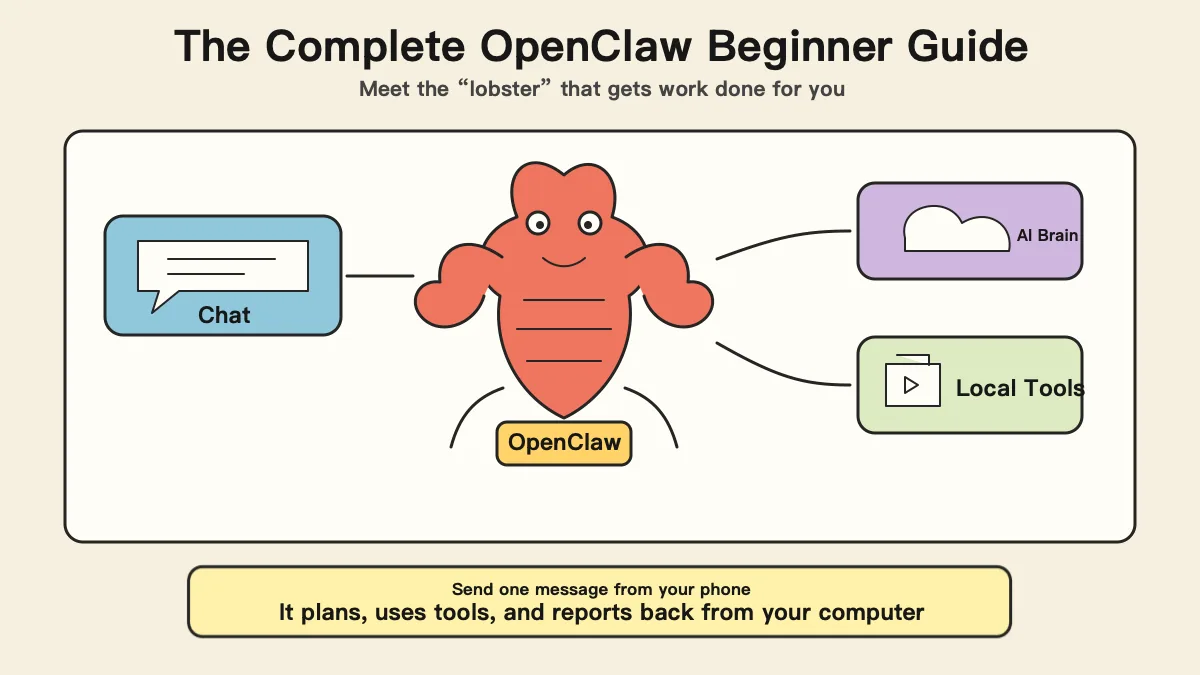
Reading time: About 2 hours Length: About 25,000 Chinese characters in the original Updated: March 2026
Reading Guide: Find the Right Starting Point
This is a long article, but you do not have to read it from beginning to end. We recommend different paths depending on your background:
| Your situation | Recommended path |
|---|---|
| You are a complete beginner and do not know what AI is | Read the final section of Chapter 3, “The Ultimate Guide for Complete Beginners,” first → then return to Chapter 1 |
| You have used ChatGPT but do not know what OpenClaw is | Start with Chapter 1 and read in order |
| You are a programmer and want to know how to participate | Skim Chapter 1 → focus on Chapter 2 and Chapter 3 · For Programmers |
| You are a product manager and want to know what to learn | Read the first two chapters → focus on Chapter 3 · For Product Managers |
| You work in e-commerce, purchasing, sales, or supply chain | Read the first two chapters → focus on Chapter 3 · For Purchasing and Sales |
All right, let us begin.
Chapter 1 From a Retired Expert’s Boring Afternoon to the World’s Hottest Open-Source Project
1. In Early 2026, the Internet Suddenly Started “Raising Lobsters”
If you opened GitHub in early 2026—a website where programmers share code, which you can think of as “TikTok for programmers”—you would have noticed something strange: everyone was talking about a little red lobster.
Not a real lobster, but a software project called OpenClaw. Its icon is a red crustacean, and developers in the Chinese community affectionately call it the “little lobster.”
In less than two months, this little lobster received more than 250,000 Stars (a Star is GitHub’s equivalent of a “Like,” used by programmers to say “this project is great”), was copied and used more than 47,000 times, and attracted over 1,000 contributors. For comparison, the famous Linux operating system—which Android on your phone is based on—took years to reach that number.
OpenClaw is the fastest-growing open-source project in history.
Jensen Huang, CEO of NVIDIA—the world’s largest AI chip company—even publicly called it “the next ChatGPT” in a CNBC interview.
But if you ask me: what exactly is OpenClaw?
In plain language—
OpenClaw is a tool that lets you remotely direct an AI on your computer to do work through chat apps such as WeChat and WhatsApp.
That may not sound very complicated. But hold on—the story is only beginning.
2. First Understand Three Key Concepts
Before telling the little lobster’s story, we need to understand three basic concepts. Do not worry; I promise to explain them in plain language.
1. What Is a Large AI Model?
Analogy: a super-smart brain trapped inside a chat box.
Have you used ChatGPT or ERNIE Bot? You type a question into a chat box and it gives you an answer. The “thing” behind those answers is a large AI model.
Imagine someone who has read almost every book, paper, web page, and piece of code in the world. Whatever you ask, they can give a reasonably good answer. But they are locked in a room and can exchange notes with you only through a tiny window. You write your question on a note and pass it in; they write an answer and pass it back.
That “super brain locked in a room” is a large AI model.
Some of today’s best-known models are:
| Large model | Creator | Where you may have seen it |
|---|---|---|
| GPT-4 / GPT-5 | OpenAI (United States) | ChatGPT |
| Claude | Anthropic (United States) | Claude’s website |
| DeepSeek | DeepSeek (China) | DeepSeek App |
| ERNIE Bot | Baidu (China) | ERNIE Bot App |
These models are extremely smart, but they share one limitation: they can “talk,” but they cannot “do.” Ask ChatGPT to write an email and it can produce the text, but it cannot open your mailbox and send it for you. It is like a genius tied to a chair: a brilliant mind with restrained hands and feet.
Remember this limitation. Later we will see how OpenClaw “unties” that genius.
2. What Is Open Source?
Analogy: a public recipe versus a secret formula.
Coca-Cola’s formula is secret and known to very few people. That is closed source: you can drink it, but you do not know how it is made.
Now imagine a chef posting the complete recipe for a delicious dish online. Anyone can read it, cook it for free, or improve it into something even better. That is open source.
Open source means making a program’s “source code”—its recipe—public so everyone can use and improve it for free.
OpenClaw is an open-source project. Anyone can download and use it, see how it works, and help improve it.
3. What Is an AI Agent? (The Most Important Concept)
Analogy: an encyclopedia versus a real assistant.
Ordinary AI, such as chatting directly with ChatGPT, is like a super encyclopedia: ask a question and it answers; ask it to write an article and it gives you one. But it can only “talk,” not “do.”
Tell it, “Send this file to Alex,” and it only explains how you could do that. It cannot actually open your mailbox, attach the file, and click Send.
An AI Agent is a real assistant. It does more than answer questions: it can take action—operate your computer, open software, edit files, and search the web. It decides what to do next and adjusts its approach when something goes wrong.
| Ordinary AI (such as ChatGPT) | AI Agent (such as OpenClaw) | |
|---|---|---|
| Capability | Conversation only | Conversation + computer operation |
| Interaction | Used on a dedicated website or App | Used in your everyday chat apps |
| Working style | You ask one thing; it answers once | You give it a task; it breaks it down and performs multiple steps automatically |
| Analogy | Encyclopedia / consultant | Intern / personal assistant |
OpenClaw turns that “super brain trapped in a chat box” into an intern that can actually work.
Two other concepts—API and Token—will appear later. There is no rush; we will explain them when needed.
3. A Retired Millionaire’s Boring Afternoon
The story begins with an Austrian.
Peter Steinberger is a software developer living in Vienna. He is best known as the founder of PSPDFKit, a toolkit that helps other apps handle PDF files. Many apps that let you view, sign, or annotate PDFs on your phone use his company’s technology.
In 2021, PSPDFKit received a strategic investment of more than €100 million (about US$116 million) from Insight Partners. Peter gradually stepped away from day-to-day management.
Then he did what many people dream of doing: he semi-retired.
That lasted about three years—traveling, spending time with family, and enjoying life. But as a creator who could never truly sit still, he kept watching AI evolve. By 2025, large AI models were already extremely powerful, but Peter noticed a contradiction:
AI is already so smart, yet it is still awkward to use. You have to open a particular website or App and sit at a computer asking one question at a time. Why can’t I direct AI from anywhere, just as easily as messaging a friend?
A Weekend Miracle
In November 2025, Peter decided to try.
His idea was simple: connect a chat app, WhatsApp, to Anthropic’s Claude Code, an AI tool that can operate a computer. A message from his phone could then reach the AI on his home computer and tell it to start working.
The first prototype was ready quickly.
He ran a small program on his computer that did two things: listen for his chat messages, then forward them to the AI on the computer for execution.
That was it. He typed “Please organize the files on my desktop” in WhatsApp, and the AI at home actually began organizing them.
He published the tool on GitHub and named it Clawdbot, a play on Claude + bot.
Why Does This Story Matter?
You may be thinking: that is not technically impressive.
That is precisely what makes the story interesting.
In the past, building a software product for a million users might have required a technical team, millions in funding, and six months to a year of development.
Peter’s story tells us that in the AI era, a good idea may matter more than coding skill. He did not invent a new technology. He simply combined existing things in a clever way—like the first person to combine a straw with a juice box. They invented neither item, but the combination changed how everyone drank juice.
4. The Renaming Drama and Crypto Scam (An Interesting Interlude)
Soon after Clawdbot became popular, it ran into an absurd controversy.
On January 27, 2026, Peter received a legal letter from Anthropic, the company behind Claude, stating that “Clawdbot” sounded too much like “Claude” and might infringe its trademark. Peter did not argue. He first renamed it Moltbot (molt refers to a lobster shedding its shell), then found the name too awkward and changed it again three days later to OpenClaw (Open = open source, Claw = claw).
At the instant of the rename, professional username squatters seized the old Twitter handle within 10 seconds. Crypto scammers immediately used the stolen account to launch a fake token called $CLAWD, whose market capitalization briefly reached US$16 million before collapsing to zero.
As of this article’s publication, OpenClaw has not issued any official token. Any so-called “OpenClaw coin” or “little lobster coin” you see is a scam.
5. How Does the Little Lobster Work?—The Plain-Language Technical Explanation
Analogy: You Hired a “Remote Intern”
Imagine this situation—
You run a small company and are overwhelmed, so you want an intern to help. There is no spare desk at the office, so you devise a plan:
- The intern works from your home (your computer)
- You send work instructions to the intern through WeChat
- After receiving them, the intern works on your computer—writing documents, editing spreadsheets, and researching online
- When finished, the intern reports back through WeChat
OpenClaw works exactly like this. Except the “intern” is AI, not a person.
| Role in the analogy | Its OpenClaw equivalent |
|---|---|
| You (the boss) | You, the OpenClaw user |
| The intern’s brain | Large AI model (Claude / GPT / DeepSeek—you choose) |
| WeChat window | WhatsApp / Telegram / Discord / WeChat |
| Your home computer | Your computer, where OpenClaw runs |
| The intern’s ability to understand instructions | The OpenClaw software itself |
Workflow (Four Steps)
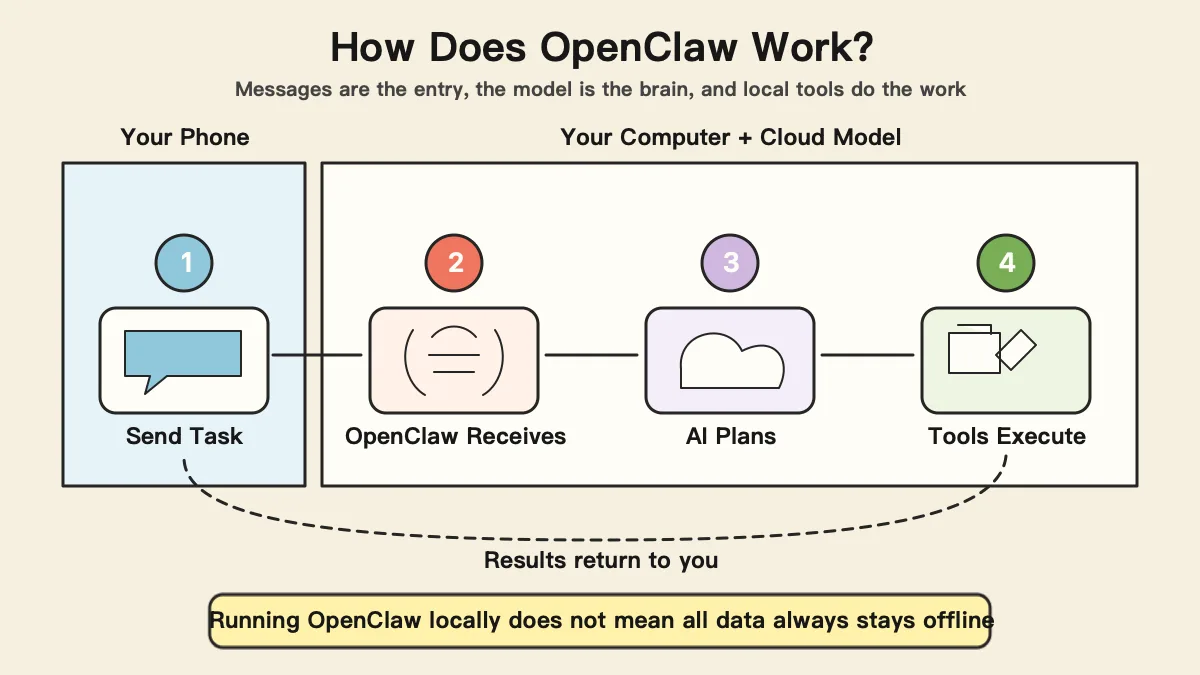
- You send a message: On WeChat, you say, “Turn the annual summary on my desktop into charts.”
- OpenClaw receives it: OpenClaw running on your computer receives the message and converts it into a format the AI understands.
- The AI thinks and acts: It finds the file → reads the data → creates charts → saves them.
- It reports back: “Done! The charts are saved on your desktop.”
Throughout this process, you may be drinking coffee in a café while your computer at home and the AI do the work.
Why Run It on Your Own Computer?
One word: security.
Would you feel comfortable if every file the AI handles—work reports and financial data—had to be uploaded to someone else’s server first?
OpenClaw keeps your files on your computer. It is like having that remote intern work inside your home, without taking your belongings elsewhere.
A concept worth explaining here—API (Application Programming Interface)
Analogy: a restaurant menu. You do not need to know how the chef cooks; you only need to order from the menu. An API is the software world’s “menu.” OpenClaw uses that menu to send your instructions to the large AI model.
Although OpenClaw runs on your computer, the AI brain itself still lives in the cloud. The “question” OpenClaw asks the AI travels through the API, but your original files are not uploaded in full.
The Skill System
Analogy: a Skill is like an App on your phone.
A new phone can make calls but has limited features. Want more? Download apps from the app store: a maps App provides navigation, and a photo-editing App retouches pictures.
OpenClaw is similar. It provides basic abilities, but you can install Skills (skill packages) to make it perform specialized work.
There is one crucial difference from phone apps: a Skill is not used directly by you; it is used by your AI assistant. You do not personally move goods in a warehouse; you tell your assistant to do it. A Skill is an instruction manual that teaches the AI how to complete a type of task.
The “Wrapper” Controversy
Some technical experts note that OpenClaw was inspired by Claude and initially centered on the Claude API, but it has evolved into an independent open-source framework supporting multiple large models. Its innovation lies in interaction design and user experience, not the underlying AI technology itself.
Think of a large AI model as the engine, and OpenClaw as the steering wheel and dashboard. OpenClaw did not build the engine, but ordinary people cannot drive the car without a steering wheel and dashboard.
6. Why It Suddenly Became Popular Worldwide
| Metric | Figure | Comparison |
|---|---|---|
| GitHub Stars | 250,000+ (in about 60 days) | Linux took years |
| Copies and uses | 47,000+ | — |
| Contributors | 1,000+ | — |
Tech giants rushed in: Tencent integrated OpenClaw with WeChat (more than one billion monthly active users), NVIDIA launched the supporting NemoClaw software stack at GTC 2026, and Alibaba Cloud and Baidu introduced one-click deployment options.
Interest was especially intense in China. WeChat provides the largest gateway, domestic models such as DeepSeek dramatically reduce costs, and the enthusiasm around “AI for everyone” has made everybody eager to understand what AI can do for them.
On February 15, 2026, Peter announced that he was joining OpenAI and transferring the project to an open-source foundation. A truly open-source project does not die when its founder leaves; it belongs to all contributors and users.
Chapter 1 Summary
- OpenClaw is an open-source tool that lets you direct AI to work through chat apps.
- Austrian developer Peter Steinberger created it and later transferred it to an open-source foundation.
- Its core innovation is not deep technology, but combining existing capabilities in a form ordinary people can use.
- It runs locally on your computer, making data safer.
- It is the fastest-growing open-source project in history, and major technology companies have entered the market.
Chapter 2 From “Usable” to “Good to Use”—The OpenClaw Ecosystem
1. ClawHub: OpenClaw’s “App Store”
Remember Skills? ClawHub is where Skills are distributed—think of it as the iPhone App Store.
As of the end of February 2026:
| Metric | Figure |
|---|---|
| Total Skills | 13,000+ |
| Contributing developers | From around the world |
How easy is it to make a Skill? At its core, it is simply a folder containing a configuration file and an instruction document. You do not need to know how to code; you only need to explain clearly what the AI should do.
Popular Skill categories include data collection, content generation, office automation, developer tools, and social media.
But One in Five Is “Bad”
Antiy’s CERT team conducted a large-scale scan and found that about one-fifth of the Skills on ClawHub behaved maliciously—more than 1,184 malicious Skills.
What is a “malicious Skill”? Consider this everyday analogy:
You download a “powerful translation assistant” from an app store. While translating for you, it secretly sends every password saved in your browser to a hacker. You receive a translation on the surface, but all your accounts are exposed underneath.
ClawHub later rushed out a publisher identity-verification system: anyone publishing a Skill must now verify their identity. It resembles the early Android app stores, which were full of viruses until Google introduced security scanning.
2. Real Use Cases: Who Is OpenClaw Actually Helping?
2.1 E-Commerce and Retail: From “People Watching Prices” to “AI Watching Prices”
| Dimension | Before (manual) | Now (OpenClaw) |
|---|---|---|
| Competitor monitoring frequency | 2–3 times a day | Around the clock |
| Coverage | 5–10 competitors | 50+ competitors |
| Response speed | Half a day from discovery to repricing | Within minutes |
| Staffing cost | 1–2 dedicated people | No labor |
Beyond price monitoring, it can automatically generate sales reports and collect competitor reviews and new-product updates.
2.2 Cross-Border E-Commerce: Five AI “Digital Employees”
This is currently one of OpenClaw’s most successful real-world scenarios. Some people have assembled teams of five AI roles:
| Role | Responsibility |
|---|---|
| Coordinator | Assign tasks and consolidate results |
| VOC analyst | Scan reviews across platforms and extract customer needs |
| Content optimizer | Optimize product titles, descriptions, and keywords |
| Reddit marketer | Community engagement and traffic acquisition |
| TikTok producer | Short-video scripts and publishing plans |
Work that once required three to five people now mainly costs API fees—several hundred to several thousand yuan per month.
This must be made clear: an AI team cannot completely replace people. Strategic decisions, brand governance, and crisis communication still require human judgment. AI is more like an extremely efficient “first-draft machine.”
2.3 Enterprise Office Work
- Daily-report automation: automatically pull data from systems each day → generate a report from a template → send it on schedule
- Meeting notes: automatically organize structured meeting highlights and action items
- Data analysis: “Analyze last month’s user retention and find the stage with the highest churn” → the AI queries data, analyzes it, and creates charts
2.4 Personal Productivity: Your “AI Butler”
- Customized morning brief: receive an industry-news summary every morning
- Calendar management: “I have a meeting with Mr. Zhang next Wednesday; check for conflicts.”
- Email handling: automatically classify emails and draft replies to important ones
These may not sound spectacular, but saving 30 minutes a day means 180 hours a year—the equivalent of 22 working days.
Important Reminder
Although the barrier to entry is lower than traditional programming, this is not a plug-and-play consumer product. You may encounter installation errors, Skills that do not fit, or occasional AI mistakes. At present, OpenClaw is better described as “a productivity multiplier for people willing to tinker.”
3. Tech Giants Race Ashore: Why Are They in Such a Hurry?
| Company / institution | Action |
|---|---|
| Tencent | Integrated OpenClaw with WeChat and launched ClawBoy |
| Alibaba Cloud | One-click deployment solution |
| NVIDIA | Launched NemoClaw at GTC 2026 |
| Baidu | One-click cloud deployment |
| Longgang, Shenzhen | “Ten Lobster Measures” policy, with subsidies of up to RMB 2 million |
The most dramatic scene came on a Friday in March 2026, when nearly 1,000 people queued at Tencent’s Shenzhen headquarters for engineers to install OpenClaw for free.
It demonstrates two things: first, ordinary people genuinely want AI Agents; second, the installation barrier still excludes many of them.
4. Business Models Already Taking Shape
OpenClaw itself is free, but its service ecosystem is already generating real revenue:
| Revenue model | What it provides | Revenue reference | Notes |
|---|---|---|---|
| Skill sales | Sell skill packages on ClawHub | $100–1,000/month each | Requires technical ability |
| Deployment services | Install and configure it for others | One reported case earned $3,600 in the first month | Requires operations experience |
| Managed services | Ongoing maintenance | $30–150/month/customer | High gross margin |
| Enterprise customization | Custom solutions for cross-border e-commerce | $500–2,000/project | Requires industry knowledge |
| Security audits | Inspect Skill security | Industry participants estimate a high ceiling | Requires security expertise |
A café analogy for understanding these four models
Skill sales = selling recipes; deployment services = fitting out the shop; managed services = operating it while the owner steps back; customization = developing a new flavor to the customer’s requirements.
The entire OpenClaw ecosystem is estimated to generate US$5–15 million in API usage fees each month—that is, fees for using large models. The money flows to Anthropic, OpenAI, and major Chinese model providers.
Reminder: most business figures above come from community reports and industry estimates rather than independent audits. They are for reference only; casually trying something does not guarantee profit.
5. Security Risks: The Part We Must Take Seriously
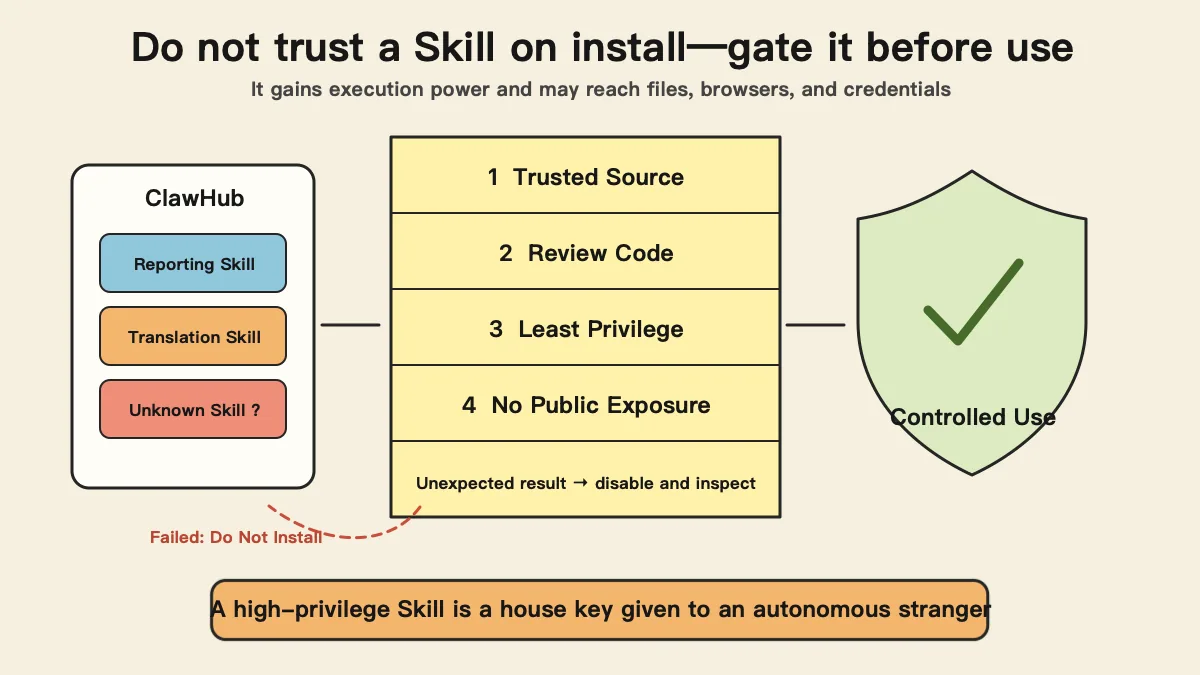
5.1 Malicious Skills
As noted earlier, about one-fifth of Skills have problems. They mainly do three things:
- Steal data: secretly read files on your computer and send them to external servers
- Inject instructions: alter the instructions received by the AI so it does things you never requested
- Steal credentials: take account passwords and API keys
Cisco’s Talos security team found large amounts of this behavior in practice.
5.2 The ClawJacked Vulnerability
This is even more frightening—
Merely opening a web page could let it silently hijack OpenClaw on your computer and make it perform operations chosen by the attacker. You would notice nothing throughout the process.
Everyday analogy: you download an apparently normal App from the phone’s app store, but it can secretly control Alipay on your phone—read your balance and transfer money—without your knowledge.
5.3 Large Numbers of Exposed Instances
After scanning the internet, security researchers found that more than 135,000 OpenClaw instances were directly exposed to the public internet, according to a SecurityScorecard report. It is like leaving your front door unlocked with the key hanging from the handle.
In a more severe case, someone’s cryptocurrency wallet key was stolen through OpenClaw, and the digital assets were transferred away—irreversibly and without recourse.
5.4 The Chinese Government’s Position
In March 2026, the Chinese government restricted the use of OpenClaw by state-owned enterprises and government agencies. The reason is clear: these organizations handle large quantities of sensitive data, while most large-model services invoked through OpenClaw are overseas, creating uncontrollable cross-border data risks.
This is not “suppressing innovation,” but reasonable risk control while the security framework remains immature.
5.5 How Ordinary Users Can Protect Themselves
- Install Skills only from trusted sources—with ratings, reviews, and verified developers
- Do not give OpenClaw sensitive information—keep bank passwords, identity numbers, and company secrets away from it
- Update promptly—the development team continually fixes vulnerabilities
- Do not expose it to the public internet—default settings are usually safe; do not disable safeguards merely for remote convenience
- Stay alert—AI can be deceived too; if a result looks wrong, stop and investigate
6. Trend Assessment: Revolution or Bubble?
Reasons for optimism:
- Jensen Huang, Tencent, and Alibaba are all betting on it
- Real use cases and business models are already working
- The shift from AI conversation to AI execution is an irreversible trend
- Open source and community-driven development have repeatedly proven resilient
Reasons for caution:
- Security problems are serious and difficult to solve completely in the near term
- The barrier to use remains relatively high
- The ecosystem is uneven and contains considerable hype
- Enterprise adoption takes time
My assessment: the AI Agent direction represented by OpenClaw is a genuine technology trend, not a bubble. But it is currently in an “infrastructure-building phase”—like the mobile internet in 2010. The direction is right, but widespread accessibility is still some distance away.
For ordinary people, the best strategy now is: follow it, understand it, and experiment carefully—but do not go all in.
Chapter 2 Summary
- ClawHub is OpenClaw’s “app store,” with more than 13,000 Skills.
- E-commerce, cross-border e-commerce, enterprise office work, and personal productivity are the main use cases.
- Business models such as Skill sales, deployment, managed services, and customization have emerged.
- Security risks are serious: roughly 20% of Skills are malicious, with real data-leak cases.
- The direction is right, but the ecosystem remains early and calls for a rational approach.
Chapter 3 Your Role, Your First Step
The first two chapters explained what OpenClaw is and what its ecosystem looks like. This chapter answers only one question: what should you do?
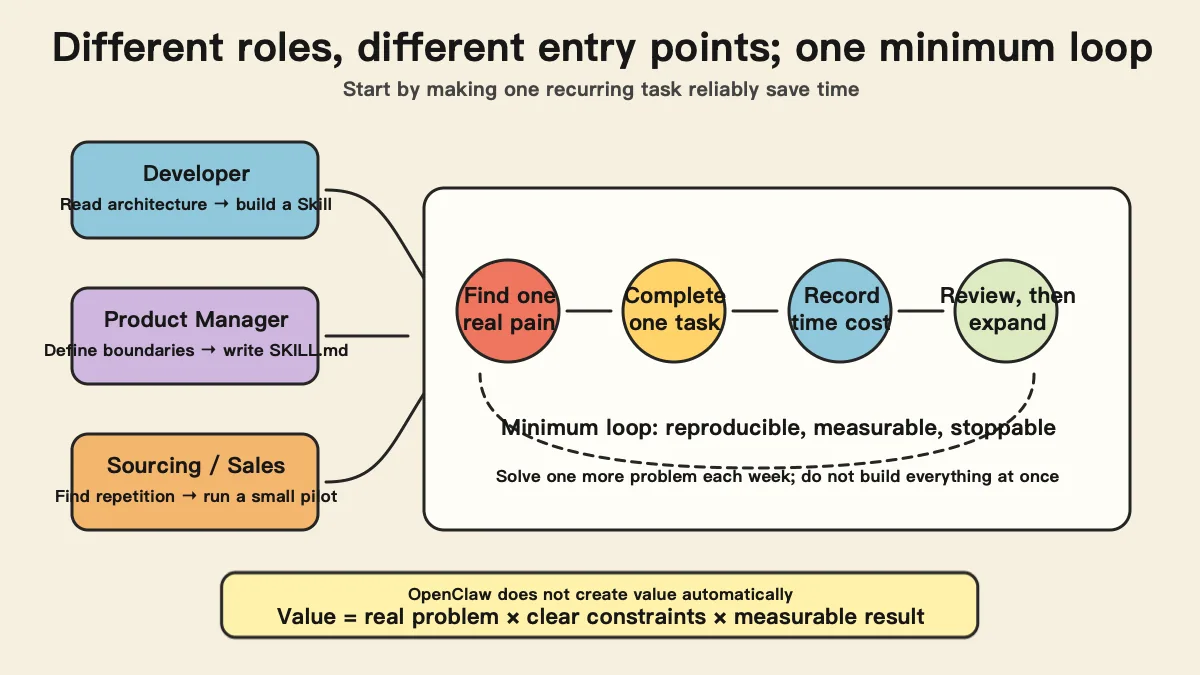
Remember one sentence first: AI tools will not automatically make money for you, but they can compress eight hours of work into one—provided you know how to use them.
1. Programmers: From “People Who Write Code” to “People Who Design Systems”
The Mindset Shift
An uncomfortable fact: in the AI era, the value of writing code itself is falling rapidly. An endpoint that takes you two hours to write can be generated by AI in 30 seconds.
What is truly valuable?
| Ability | Can AI replace it? | Value trend |
|---|---|---|
| Writing specific functions / endpoints | Mostly | Falling |
| System architecture design | Very difficult | Rising |
| Defining standards and constraints | No | Rising sharply |
| Understanding business and translating it into technical solutions | No | Rising sharply |
OpenClaw’s Skill ecosystem resembles the App Store when it launched in 2008: the ecosystem is empty, and nobody has addressed many vertical-industry needs. First come, first served.
A 30-Day Beginner Roadmap
Prerequisites: you can use the command line (terminal) and have a Node.js environment. If these words mean nothing to you, skip to “The Ultimate Guide for Complete Beginners” at the end of this chapter.
Week 1: Deploy + experience
- Install Node.js 18+ (nodejs.org)
- Install the OpenClaw CLI
- Obtain an API Key for a large model (register at console.anthropic.com; new users receive free credits)
A concept worth explaining here—Token (like a game token)
Large AI models charge not by the “request” but by the Token. One Token is roughly half a Chinese character. Every message you send consumes Tokens, as does the AI’s response.
Models have different prices: some are expensive, some cheap, and some include a free allowance. OpenClaw itself is free, but you pay for AI usage—like free translation software where you still pay the phone bill.
Once it works, install three to five Skills related to your work from ClawHub and try them.
Security reminder: read the source, check ratings, and do not grant access to sensitive data before installation.
Week 2: Read the source and understand the architecture
Find and download a simple, highly rated Skill. Focus on two files:
claw.json: the Skill’s “identity card”SKILL.md: the Skill’s “soul”—a natural-language description of the AI’s behavior
Learn about MCP (Model Context Protocol), the underlying tool invocation protocol; documentation is here.
Week 3: Build your first Skill
Start with a real pain point of your own. The simplest Skill looks like this:
1
2
3
my-skill/
├── claw.json      # Configuration: the Skill's name and capabilities
└── SKILL.md       # Behavior definition: a natural-language description of what the AI should do
Week 4: Publish it on ClawHub
Complete the configuration → write the README → submit for review → launch. Congratulations, you are now a Skill developer.
Advanced Directions
| Direction | Entry barrier | Revenue reference | Best suited to |
|---|---|---|---|
| Vertical-industry Skills | Medium | $100–1,000/month each | Developers with industry experience |
| Security auditing | High | High ceiling | Security developers |
| Enterprise architecture | High | $5K–50K/project | People with enterprise-service experience |
| MCP protocol development | High | Early ecosystem; establish a position first | People interested in low-level protocols |
A Formula for Strengthening Your Résumé
“Find a real pain point → design an OpenClaw solution → produce measurable results”
Good description: “Built a security-scanning Skill with OpenClaw that found 47 data-exposure issues across three projects and reduced security review time from two hours to five minutes.”
Bad description: “Learned OpenClaw and developed some Skills.”
2. Product Managers: From “People Who Draw Prototypes” to “People Who Define AI Behavior”
The Mindset Shift
The product manager’s core deliverable is changing fundamentally:
| Traditional PRD | SKILL.md (the PRD of the new era) |
|---|---|
| Written for developers | Written for AI |
| Can be ambiguous because developers ask questions | Must be precise because AI does not infer what you leave unsaid |
| Changes require development scheduling | Change one line and AI behavior changes immediately |
| Feedback cycle: days / weeks | Feedback cycle: seconds |
A harsh fact: you do not need to write code, but it is hard to use OpenClaw well if you cannot understand even JSON—a data format, just as Excel is a spreadsheet format—or have no idea what to do when an error appears.
A 30-Day Beginner Roadmap
Week 1: Get it running first
- Best option: ask a programmer friend to install it and buy them a coffee
- Or use a cloud-hosted option (one-click deployment from Alibaba Cloud / Tencent Cloud)
- Once installed, first ask it to generate an industry morning brief
Week 2: Improve your work with existing Skills
| Scenario | Before | After using a Skill |
|---|---|---|
| Classifying user feedback | Read tickets one by one for two hours | AI classifies them in five minutes |
| Competitor analysis | Half a day of manual organization | Automatic collection + comparison |
| Writing weekly reports | One hour | Automatically generate a first draft |
Week 3: Write your first SKILL.md
This is the most important exercise for a PM. The core principles:
- Write it like a handbook for an intern—do not assume the AI “understands” you
- Define boundaries—what the AI must not do is as important as what it should do
- Provide examples—instead of saying “make the format attractive,” show the desired output
- Iterate—run it several times and adjust the description based on the results
Week 4: Complete a full product case study
Complete the loop of “define requirements → configure the Skill → run → gather feedback → iterate.” Document the process; it becomes part of your job-seeking portfolio.
A Job-Seeking Advantage
According to a community report, someone used an OpenClaw project to land a product role at a major tech company. The key is not “you know how to use OpenClaw,” but “you can solve real product problems with AI tools.”
3. Purchasing, Sales, and Supply Chain: From “Manual Order Follow-Up” to “AI-Automated Operations”
The Mindset Shift
Start with a self-assessment: where does your time go each day?
| Daily task | Can AI take over? |
|---|---|
| Manually checking competitor prices | Completely |
| Compiling daily / weekly reports | Completely |
| Answering standard questions | Mostly |
| Following up on shipments | Automatic reminders |
| Organizing customer feedback | Completely |
| Negotiating prices with suppliers | No |
| Deciding whether to source a product | It can assist, not replace you |
AI takes over “information collection” and “formatted output”; people remain responsible for “judgment” and “decisions.”
A 30-Day Beginner Roadmap
Week 1: Do not touch the tools; think clearly first
Take a sheet of paper and write down your repetitive work from the past week, how much time each task took, and its inputs and outputs. Choose the one or two most painful tasks; that is your starting point.
Recommended starting points:
- Manually checking competitor prices every day → automated AI monitoring
- Manually preparing daily reports → automated AI generation
- Organizing user reviews every week → bulk AI analysis
Week 2: Solve one problem with one Skill
For example, tell the AI this for “competitor price monitoring”:
1
2
3
4
5
6
Every morning at 9:00, monitor price changes for these five competitors:
1. [Competitor A] - [link]
2. [Competitor B] - [link]
...
Output: a price comparison table (including yesterday's price, today's price, and percentage change).
Highlight reductions greater than 10% in red and add a one-sentence recommendation.
Cost reminder: large-scale collection and analysis consume Tokens. Test on a small scale first—one or two competitors—and expand only after confirming the results. Some community members report burning through hundreds of yuan a day because of poor configuration.
Week 3: Connect multiple Skills
1
Competitor monitoring → sales data analysis → intelligent recommendations → push notifications to the work group
Week 4: Review the results
Three questions: ① How many hours did AI save you? ② What did you do with the saved time? ③ What is the next most valuable thing to automate?
Cross-Border E-Commerce
The complete chain:
- VOC analysis: analyze Amazon reviews in bulk and extract user pain points and keywords
- Content generation: optimize Listings and create promotional copy based on VOC insights
- Traffic acquisition: schedule publication across platforms (this step still needs people, but content preparation falls from four hours to 30 minutes)
Commercialization
Your industry knowledge + AI configuration ability = a new business.
Once you use it effectively yourself, peers, suppliers, and customers will have the same pain points. Configure OpenClaw for them; according to community reports, custom projects earn $500–2,000 each.
Why do purchasing and sales professionals have an advantage over programmers here? Because you understand the industry. A programmer can configure the tool, but does not know the business logic and decision process behind “checking competitor prices every day.” You do.
4. Foundational Abilities Shared by All Three Roles
1. Prompt Engineering: How to Talk to AI
Bad: “Analyze the data for me.”
Good: “Analyze the attached Q4 2025 sales data: ① rank sales by category in descending order; ② calculate quarter-over-quarter growth; ③ flag growth above 50% and below -20%; ④ output a Markdown table; ⑤ provide three key insights.”
Three core principles: define the input, define the output, and define the constraints.
2. Problem-Definition Ability
AI can solve problems, but it cannot find the right problem for you.
Good AI problems are frequent, repetitive, rule-based, and time-consuming without requiring creativity. Poor fits require interpersonal judgment or depend on real-time offline information.
3. Security Awareness
- Install only trusted Skills
- Do not give core data to Skills you do not trust
- Control Token costs by setting daily / monthly limits
- State-owned enterprises and public institutions should confirm compliance first
4. Learning Ability
Do not try to “finish learning.” Learn how to learn. Spend 30 minutes each week browsing new Skills and following official updates.
5. The Ultimate Guide for Complete Beginners
If You Know Nothing Right Now
Step 1 (5 minutes): ask yourself, “What is the most repetitive and boring task in my daily life?” If you cannot answer, observe yourself for a week.
Step 2 (30 minutes): try a free AI tool to experience “talking with AI”:
Ask AI to do one thing you would otherwise have done manually today.
Step 3 (30 minutes): closely read the “Week 1” section for your role in this chapter.
Step 4 (1–2 hours): take action. Do not overthink it; start first.
Common Misconceptions
| Misconception | Reality |
|---|---|
| “AI will replace me” | People who use AI will replace people who do not. Accountants did not disappear when Excel arrived, but those who could not use Excel did |
| “I cannot use it without knowing how to code” | You do not need to write code, but you must understand simple configuration and follow command-line instructions. It is roughly as difficult as learning Excel formulas |
| “Once it is installed, it will make money” | A tool is only a tool. A good hammer does not build a house by itself |
| “I need to build the complete system in one step” | Solve the single most painful problem first, prove it works, then expand. Do not bite off more than you can chew |
Mindset Advice
- Allow yourself to be slow—feeling unable to do anything for the first few days is normal; one day it suddenly clicks
- Start with the smallest problem—first let AI save you ten minutes
- Document your learning—write down the pitfalls and techniques you discover
- Find peers—join a community and find several people to learn with and hold one another accountable
- Stay curious and skeptical—be curious about tools and skeptical of “overnight riches”
Chapter 3 Summary
- Programmers: Skill development is the new iOS App opportunity, and you can get started in 30 days.
- Product managers: SKILL.md is the PRD of the new era; the core skill shifts from drawing prototypes to defining AI behavior.
- Purchasing and sales: automate the most painful step first, then expand gradually.
- Shared abilities: Prompt engineering, problem definition, security awareness, and continuous learning.
- Complete beginners should not be afraid: try a free AI tool first, then go deeper step by step.
Epilogue: Embrace the Little Lobster Rationally
Return to the opening question: what should we do about the OpenClaw opportunity?
Three levels of answers:
Level 1 (do it now): understand what it is. You have finished this article, so this step is complete.
Level 2 (do it this week): try it yourself. Register for a free AI tool (ChatGPT / Claude / Kimi) and experience what AI can do for you.
Level 3 (do it continuously): find your place. Based on your role and industry, identify a painful problem and solve it with AI tools. Then turn that ability into your competitive advantage.
One final sentence—
In the AI era, what matters most is not which tools you can use, but which problems you can discover and which requirements you can define. Tools become obsolete; insight does not.
Further Reading
| Resource | Link | Description |
|---|---|---|
| OpenClaw Wikipedia | en.wikipedia.org/wiki/OpenClaw | The most comprehensive project history |
| KDnuggets explainer | kdnuggets.com | English technical explainer |
| Fortune on the China boom | fortune.com | Chinese market analysis |
| 36kr deep dive | 36kr.com | New issues in Agent and team collaboration |
| Peter’s story | newsletter.pragmaticengineer.com | In-depth interview with the founder |
| MCP protocol documentation | modelcontextprotocol.io | Official documentation for the underlying protocol |
| Anthropic Console | console.anthropic.com | Obtain an API Key |
| Node.js | nodejs.org | Install the runtime environment |
This article reflects information available as of March 2026. The OpenClaw ecosystem evolves rapidly, and some content may change with new versions; refer to the latest official documentation. Figures marked “according to community reports” or “industry estimates” have not been independently audited and are provided only as rough references.