Agents Are a Spectrum: From Soft Routing and Tool Selection to an Autonomous Loop with Pi
A practical map of Agent patterns, followed by minimal read-only examples using the Pi CLI, SDK, and Extension API
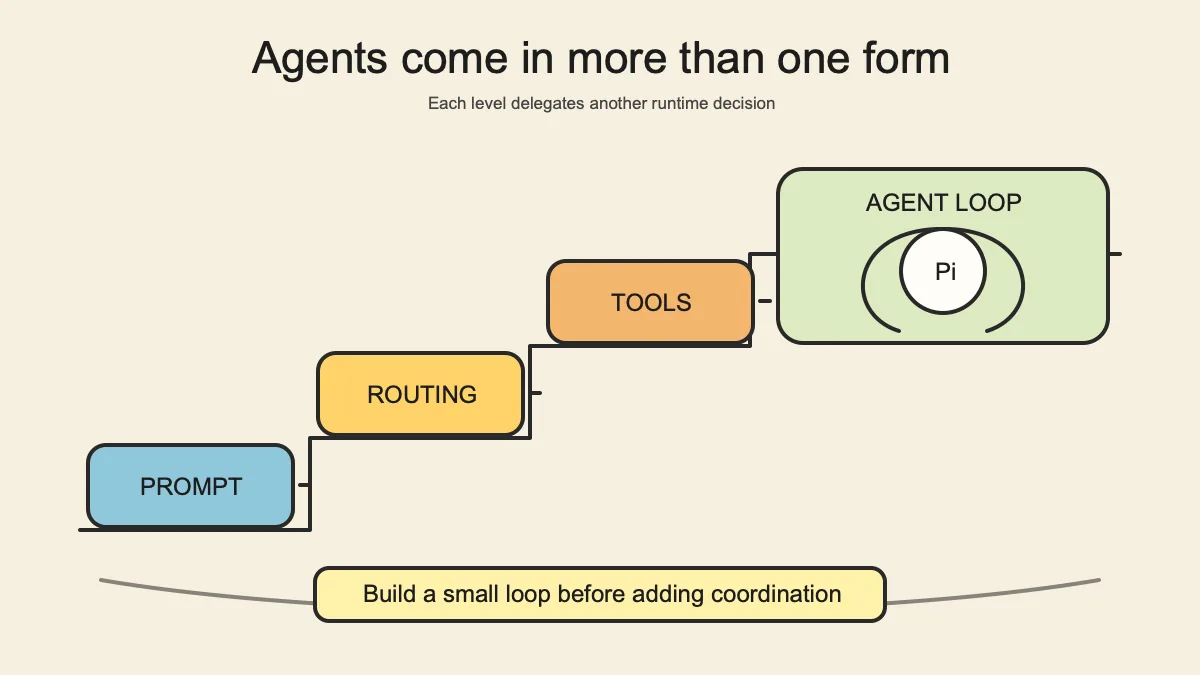
The previous article, Chat, Workflow, or Agent?, used one question to separate the patterns: who decides the next step? This article goes one level deeper into the Agent itself.
When a team says, “We built an Agent,” it may mean that a model switches prompts, selects tools, runs an observe–act loop, or delegates work to other Agents. Those systems do not possess the same decision authority.
We will use this engineering spectrum:
1
2
3
4
5
6
Prompt Routing
→ soft routing
→ automatic tool selection
→ constrained Agent Loop
→ Planner / Executor
→ Multi-Agent
This is not an official taxonomy from Pi or an industry maturity model. It is a teaching device for locating what the model is actually allowed to decide.
Five questions reveal how autonomous an Agent really is
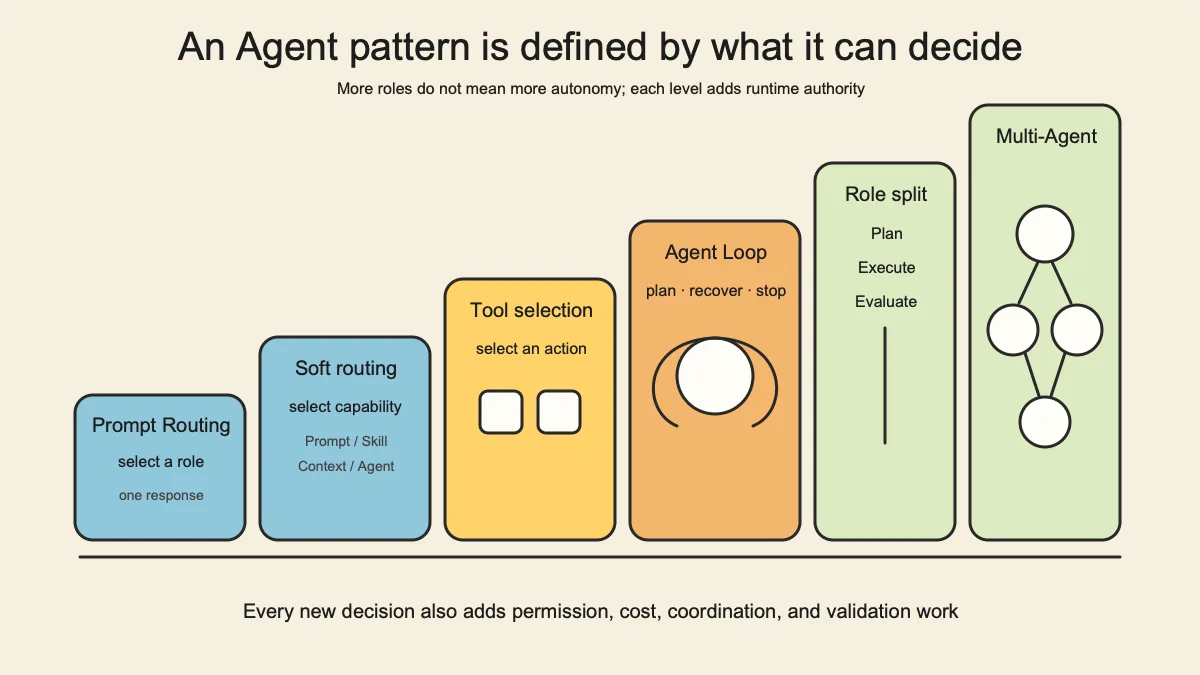
When examining an Agent system, ask five questions in sequence:
| Decision axis | Question |
|---|---|
| Capability selection | Who chooses the Prompt, Skill, or specialist Agent to load? |
| Tool selection | Who chooses the tool and arguments? |
| Step planning | Who decides what to do next? |
| Failure recovery | Who retries, changes tools, or changes strategy? |
| Termination | Who decides the task is complete? |
The first two are common in systems that appear intelligent because they route dynamically. The last three are what turn a one-shot choice into a continuing Agent Loop.
More autonomy is not automatically better. Authorization, payments, and destructive data operations should usually remain behind deterministic code and human gates rather than being delegated merely to make a system “more agentic.”
Pattern 0: Persona / Prompt Routing
The simplest pattern switches prompts according to the input:
1
2
3
code question → “You are a senior engineer”
contract question → “You are a legal assistant”
marketing question → “You are a content strategist”
If the system produces one response after routing, the more precise name is Prompt Routing or Persona Routing.
This is useful for isolating domain context, style, and a small rule set. But changing the model’s hat does not create tools, state, recovery, or an execution loop. Several persona prompts do not by themselves form a Multi-Agent system.
Pattern 1: soft routing
In this article, soft routing means that software supplies descriptions of candidate capabilities and the model selects the one that semantically fits the current request.
1
2
hard routing: if (type === "math") loadMathSolver()
soft routing: the model reads candidate descriptions and chooses one
“Soft routing” is our teaching term here, not an official Pi or framework feature name.
The selected object might be:
- a Prompt;
- a Skill or Ability;
- a context source;
- a specialist Agent;
- a model or reasoning tier.
Soft routing handles fuzzy intent that is difficult to enumerate and makes new capabilities easier to add. It also creates new failure modes: overlapping descriptions cause misrouting; too many candidates consume context; identical inputs may not always route identically; and a bad choice can be amplified during execution.
The engineering task is therefore not to write, “Choose the best Agent automatically.” Candidate boundaries must be distinguishable, the selection should leave evidence, and high-risk categories still need hard gates.
Pattern 2: automatic tool selection
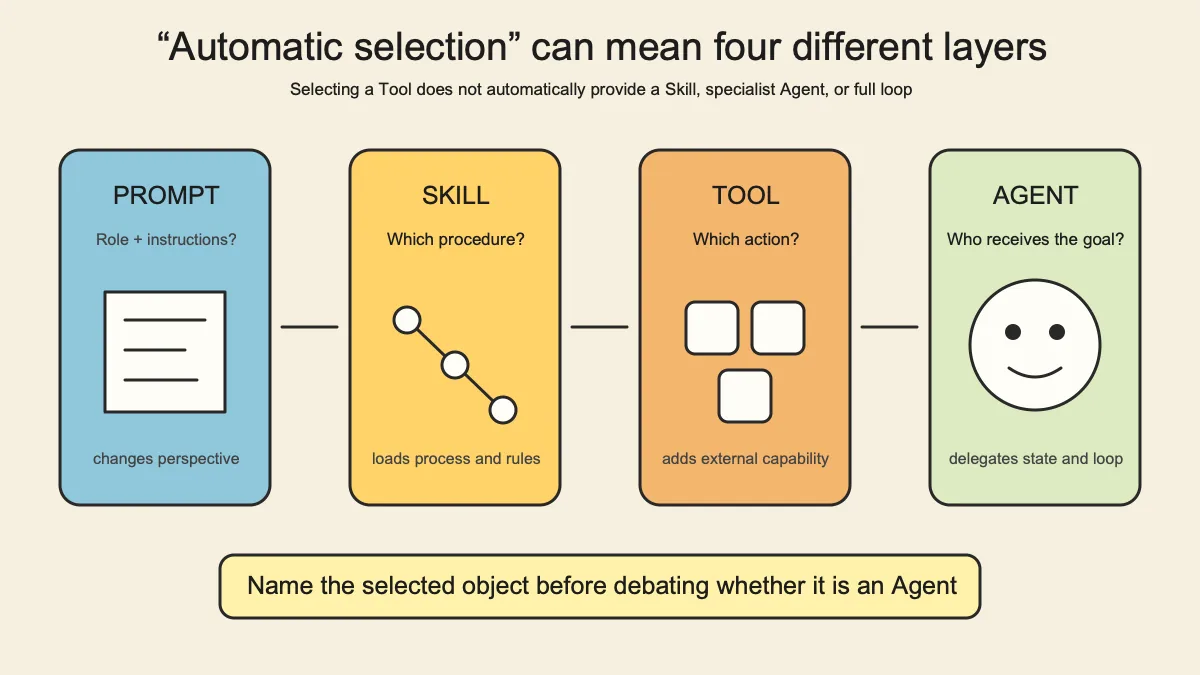
Function-calling systems commonly describe a tool with four elements:
1
name + description + parameters + result
The model reads those descriptions and chooses whether to call a tool, which one, and with which arguments. Examples include:
read_file: read one file;search_docs: search documentation;get_weather: obtain weather for a location.
That is automatic tool selection. Whether it forms an Agent depends on what follows:
1
2
3
4
5
model selects one tool → application returns the result and stops
≈ a one-shot application with a tool

model selects a tool → observes the result → selects again or stops
≈ an Agent Loop
More tools do not guarantee more capability. Similar descriptions and ambiguous parameters reduce selection quality. A good tool has a crisp boundary, understandable results, explicit error semantics, and ideally solves one complete problem.
Pattern 3: the constrained Agent Loop
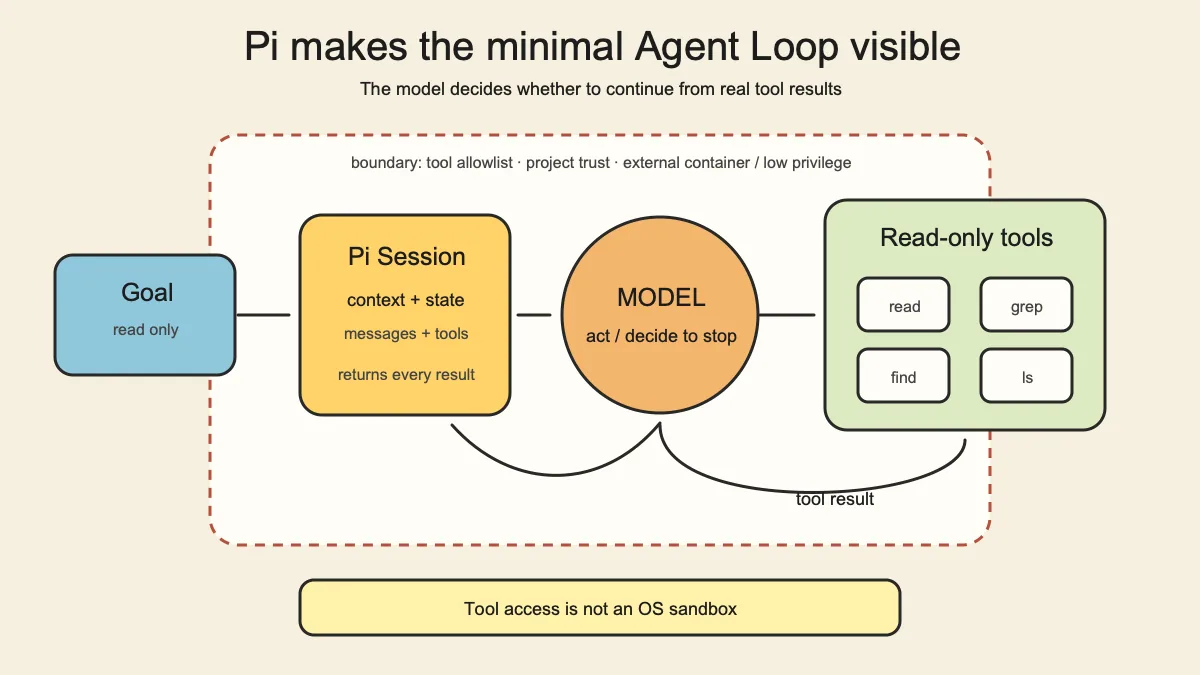
The essential Agent structure is a loop driven by observations:
1
2
Observe → Decide → Act → Observe
                    ↘ Done / Escalate
The model does not guess an entire workflow up front. After every action, it reads a real result and decides whether to continue, change strategy, or stop. It may read package.json, discover a TypeScript project, inspect tsconfig.json, find the test command in package scripts, and stop once the evidence is sufficient.
Production autonomy should be bounded. At minimum, define:
- a tool allowlist;
- maximum time, turns, or spend;
- actions requiring human approval;
- observable completion criteria;
- detection for no progress, repeated calls, and errors;
- replayable inputs, calls, results, and conclusions.
An Agent Loop is not while (true). A loop without termination and budget is an operational hazard.
Pattern 4: Planner, Executor, and Evaluator
Complex work is often separated into roles:
1
Planner creates a plan → Executor performs it → Evaluator checks it
This separation can reduce context pressure, keep execution focused, and prevent the implementer from relying entirely on self-evaluation.
However, a fixed Planner → Executor → Evaluator sequence may still be a Workflow. Runtime autonomy increases only when roles can update the plan from evidence, send work back, or split it differently.
Role names do not determine the architecture. Actual decision authority does.
Pattern 5: Multi-Agent
Common Multi-Agent topologies include:
- a Supervisor dispatching work to several Workers;
- Specialists for security, code, data, or other domains;
- Peer or Swarm systems exchanging findings until they converge.
They make sense when work is genuinely parallel, context can be isolated, and outputs have a clear merge contract. Otherwise, coordination can cost more than it returns: Agents reread the same background, conclusions conflict, failure provenance becomes unclear, and token use grows quickly.
Multi-Agent is not the final evolutionary stage of an Agent. Many tasks need only one Agent, a few well-designed tools, and a firm acceptance contract.
Why Pi is useful for showing a minimal Agent
Pi describes itself as a minimal terminal coding harness. The examples below target earendil-works/pi and @earendil-works/pi-coding-agent v0.84.1, which requires Node.js >= 22.19.0. Versions and interfaces change; consult the current project documentation before adopting the examples.
Pi is useful pedagogically because its minimal pieces remain visible:
- it exposes four built-in tools by default:
read,write,edit, andbash; - it supports interactive, print / JSON, RPC, and SDK usage;
- TypeScript Extensions can register custom tools;
- the core intentionally omits complete workflows such as sub-agents and plan mode, leaving them to Extensions or Packages.
That lets us see the mechanism directly:
1
model + instructions + tools + returned tool results + loop = minimal Agent
One security fact is essential: Pi is not a complete operating-system permission sandbox by default. Tools run with the current machine and process permissions, and Extensions can execute arbitrary code. --tools controls which tools the model can see; it is not container isolation or an OS-level boundary. Install only trusted sources and combine project trust with containers, low-privilege accounts, or other external isolation when the environment is untrusted.
Practice 1: launch a read-only Agent with one command
Install the pinned version used by this article:
1
pnpm add -g --ignore-scripts @earendil-works/pi-coding-agent@0.84.1
After configuring model credentials, run this inside a project you want to inspect:
1
2
pi --tools read,grep,find,ls -p \
  "Inspect this project, identify its technology stack, and list the evidence files supporting your conclusion. Do not modify files."
The prompt does not specify which files to read. The model chooses among find, read, grep, and ls, observes the results, decides whether it has enough information, and then responds.
That is already a minimal Agent Loop: the person supplies the goal and boundary; the model chooses the inspection path.
Why begin read-only? The default write, edit, and bash tools enlarge the side-effect surface. When learning how Agents behave, inspecting the decision loop is easier than debugging the loop and filesystem mutations at the same time.
If the project contains local Pi settings, Extensions, or Skills, review the project-trust prompt. Non-interactive modes cannot display that prompt, so use --approve or --no-approve deliberately rather than burying the trust decision in a script default.
Practice 2: embed a minimal Agent with the Pi SDK
After installing the same package, a Node/TypeScript application can create an in-memory session:
1
2
3
4
5
6
7
8
9
10
11
12
13
14
15
16
17
18
19
20
21
22
23
24
25
26
27
import {
  createAgentSession,
  ModelRuntime,
  SessionManager,
} from "@earendil-works/pi-coding-agent";

const modelRuntime = await ModelRuntime.create();
const { session } = await createAgentSession({
  modelRuntime,
  sessionManager: SessionManager.inMemory(),
  tools: ["read"],
});

session.subscribe((event) => {
  if (
    event.type === "message_update" &&
    event.assistantMessageEvent.type === "text_delta"
  ) {
    process.stdout.write(event.assistantMessageEvent.delta);
  }
});

await session.prompt(
  "Read package.json and explain the project entry points and scripts. Report only facts supported by the file.",
);

session.dispose();
The program creates a model runtime, opens an in-memory session, exposes only the read tool, and submits a goal instead of a list of procedural commands. session.prompt() waits for the accepted run to complete, including tool calls and subsequent model turns.
The example deliberately withholds bash, edit, and write. Add privileges individually only after tool selection, errors, and termination behavior are observable and testable.
Practice 3: register a side-effect-free custom tool
A Pi Extension can expose a model-visible tool through pi.registerTool(). The following example only counts TODO markers in provided text; it does not access the network or write files:
1
2
3
4
5
6
7
8
9
10
11
12
13
14
15
16
17
18
19
20
import type { ExtensionAPI } from "@earendil-works/pi-coding-agent";
import { Type } from "typebox";

export default function (pi: ExtensionAPI) {
  pi.registerTool({
    name: "count_todos",
    label: "Count TODOs",
    description: "Count standalone TODO markers in a provided text block.",
    parameters: Type.Object({
      text: Type.String({ description: "Text to inspect" }),
    }),
    async execute(_id, { text }) {
      const count = text.match(/\bTODO\b/g)?.length ?? 0;
      return {
        content: [{ type: "text", text: `TODO count: ${count}` }],
        details: { count },
      };
    },
  });
}
Save it as ./count-todos.ts, then run a temporary test:
1
2
pi --extension ./count-todos.ts --tools count_todos -p \
  "Count the TODO markers exactly: TODO fix parser. Note only. TODO add test."
Then try a prompt that should not need the tool:
1
2
pi --extension ./count-todos.ts --tools count_todos -p \
  "Explain the idea of technical debt. No counting is required."
Tool selection depends on the model, prompt, and context, so one demonstration is not a stable contract. A real routing test should include at least three classes: should call, should not call, and missing arguments.
Extensions execute with the current process permissions. Do not run untrusted Extensions, and never place API keys in source code or shell history.
The distance from a minimal demo to production
The examples prove that a loop can run. They do not prove that it is production-ready:
1
2
3
4
5
6
7
8
9
10
11
Demo
  = goal + tools + loop

Usable system
  = Demo
  + permissions and isolation
  + cost and time budgets
  + durable state and recovery
  + logs and observability
  + result validation
  + human approval and stop controls
Once an Agent can write files, run commands, send messages, or modify business data, the outer Harness becomes the main engineering effort. Its job is to ensure that even a mistaken model judgment cannot cross the system boundary.
That is the problem addressed by Harness Engineering. When your Skills begin to accumulate not only procedures but also stable judgment, continue with Skills Teach AI to Do; Abilities Teach AI to Judge.
Finally: begin with one Agent whose boundary is obvious
A reliable starting point is not a Supervisor plus five specialists. It is:
1
2
3
4
5
1 Agent
→ 2–4 sharply bounded read-only tools
→ 5–10 real task tests
→ record misroutes, missed calls, repetition, and premature stopping
→ then decide whether soft routing or Multi-Agent is justified
First make one small loop understandable, observable, and stoppable. Add routing layers and coordinators only when context, capability, or parallelism has become a measured bottleneck.
If you have not yet decided whether a business problem needs Chat, Workflow, or Agent, return to the scenario selection guide. The first architecture decision is not how to build an Agent, but where uncertainty is valuable enough to delegate.
References
- Pi Coding Agent README (v0.84.1): CLI usage, built-in tools, and run modes.
- Pi SDK documentation (v0.84.1):
createAgentSession()and embedded usage. - Pi Extension documentation (v0.84.1): custom tools and the Extension API.
- Pi Security documentation (v0.84.1): permission boundaries and security notes.