Securely Sync Your Development Environment with chezmoi: Auditable Dotfiles from Scratch
Build cross-device configuration sync with chezmoi, a private GitHub repository, age, and Gitleaks while preventing plaintext SSH, database, and AI-tool credentials from entering Git
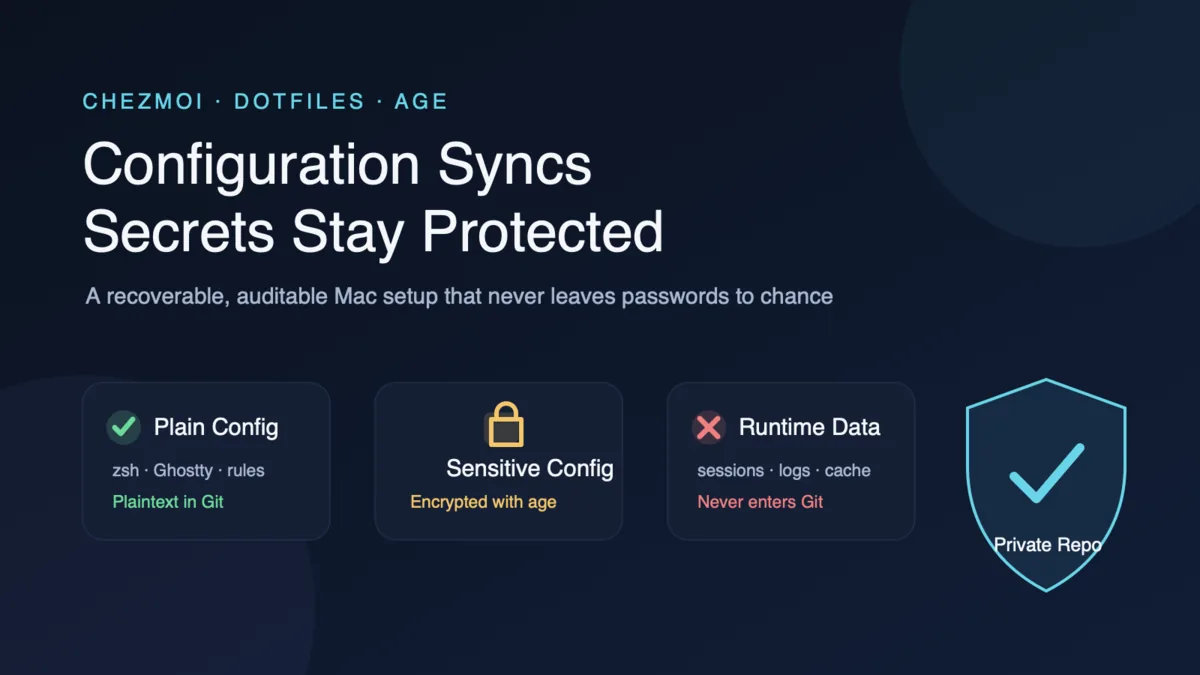
If you develop on a Mac, you have probably had this experience: your new computer arrives, you install your everyday software in half an hour, and then spend the rest of the day trying to remember what you had customized. Cursor shortcuts, the Ghostty font, dozens of lines in .zshrc, SSH hosts, Hammerspoon scripts, and separate rules for Codex and Claude Code are scattered everywhere.
I considered the most direct solution too: put every configuration file in a private repository. But once I started, the unsettling question was not “can this be synchronized?” It was “will one careless action someday commit a database password or SSH private key to Git in plaintext?” Private is an access-control setting, not a mistake-proofing system.
This approach is therefore not a simple backup of $HOME, but a pipeline with checkpoints:
1
2
3
4
5
6
7
Actual local configuration
    ↓ Manage one file at a time
chezmoi source state
    ↓ age encryption + local secret scanning
GitHub Private Repo
    ↓ Pull on a new device
chezmoi previews changes and restores files
We will use chezmoi to manage configuration, age to manage ciphertext, and Gitleaks to guard commits. The process begins with one low-risk file. Only after confirming that every layer works will we migrate IDE, Agent, SSH, and database configuration in batches.
This tutorial is less concerned with “how to upload files” than with one question: how do you stop a secret before the very first commit?
This article focuses on macOS and was written on 2026-07-28. Replace
YOUR_GITHUB_USERNAMEand the repository name in the commands with your own values.
1. Address the biggest concern first: private does not mean secure
1. A private repository is not a safe
A private GitHub repository provides access control, not secret management. Once a plaintext secret enters Git, it creates at least these risks:
- Git objects and commit history retain content over the long term; deleting a working-tree file does not delete its history;
- local clones, backups, GitHub Apps, and collaborator accounts may all hold copies;
- repository permissions, visibility, or account-security settings may change in the future;
- even if GitHub detects a token, it may not recognize an ordinary password, proxy subscription, or custom connection string.
At the time of writing, GitHub’s official documentation is explicit: Secret Scanning is available free of charge for public repositories; private organization repositories require the relevant GitHub Secret Protection capability; and an ordinary private repository under a personal account cannot be assumed to have comprehensive scanning protection. Push Protection for personal accounts primarily blocks secrets from being pushed to public repositories by default.
Our goal is therefore not to “wait for GitHub to alert us after a leak,” but this:
1
Secrets must not enter the first commit in plaintext
2. Five layers of defense that actually help
A private repository is still worthwhile, but it belongs at the last layer. Before it, we need five checks that can stop the process locally:
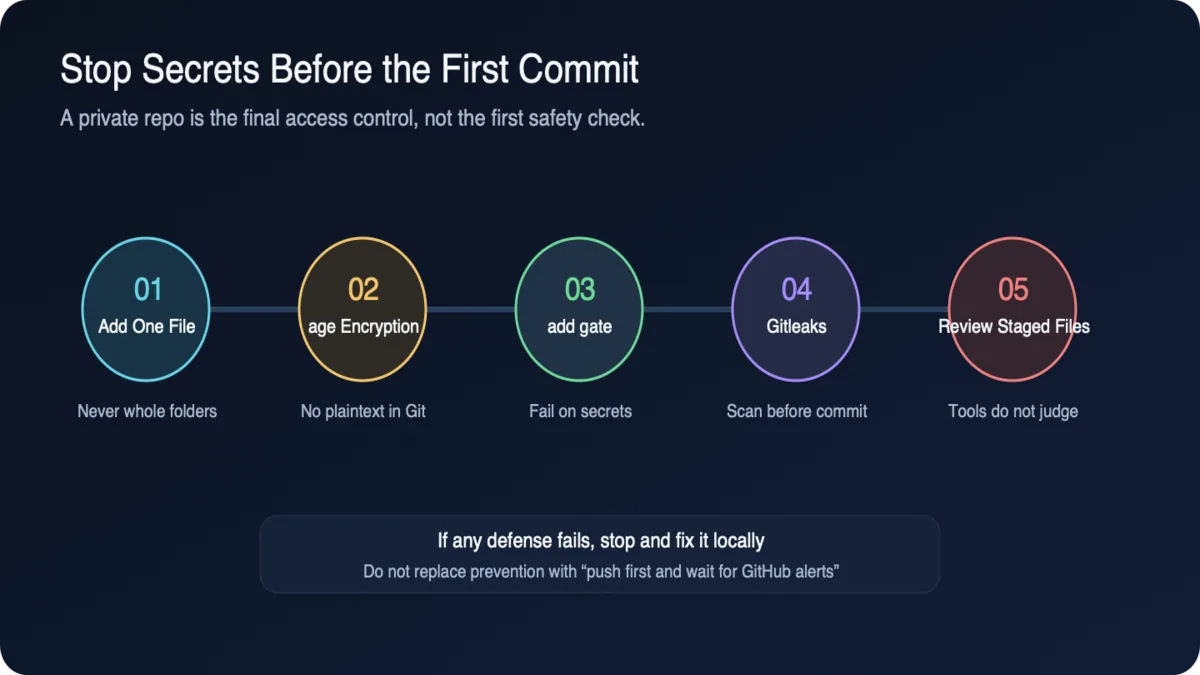
Every infographic in this article can be clicked to open the full-resolution original. The diagrams provide a quick overview; the prose remains authoritative for precise boundaries.
| Defense | Problem it solves | Limitation |
|---|---|---|
| Explicit per-file management | Prevents entire configuration directories, caches, and sessions from being added together | Depends on human classification |
| age encryption before storage | Keeps only ciphertext in Git | The private key must be backed up separately |
| chezmoi add secret gate | Immediately fails when a secret is found while adding a normal file | Covers only chezmoi’s add entry point |
| Local Gitleaks scan | Blocks common token, private-key, and password patterns from commits | Cannot detect every custom secret |
| Manual staged-diff review | Catches hosts, paths, and business information that tools do not recognize | Cannot be fully automated |
.gitignore, .chezmoiignore, and a private repository are supporting defenses; none replaces these five gates.
2. Sort your luggage first: not every configuration belongs on the trip
When you see a configuration directory, it is tempting to think that copying the whole thing is easiest. Resist that impulse. Whether a file should be synchronized depends not on its name, but on two questions: does a new device actually need it, and can it safely be seen by someone with repository access?
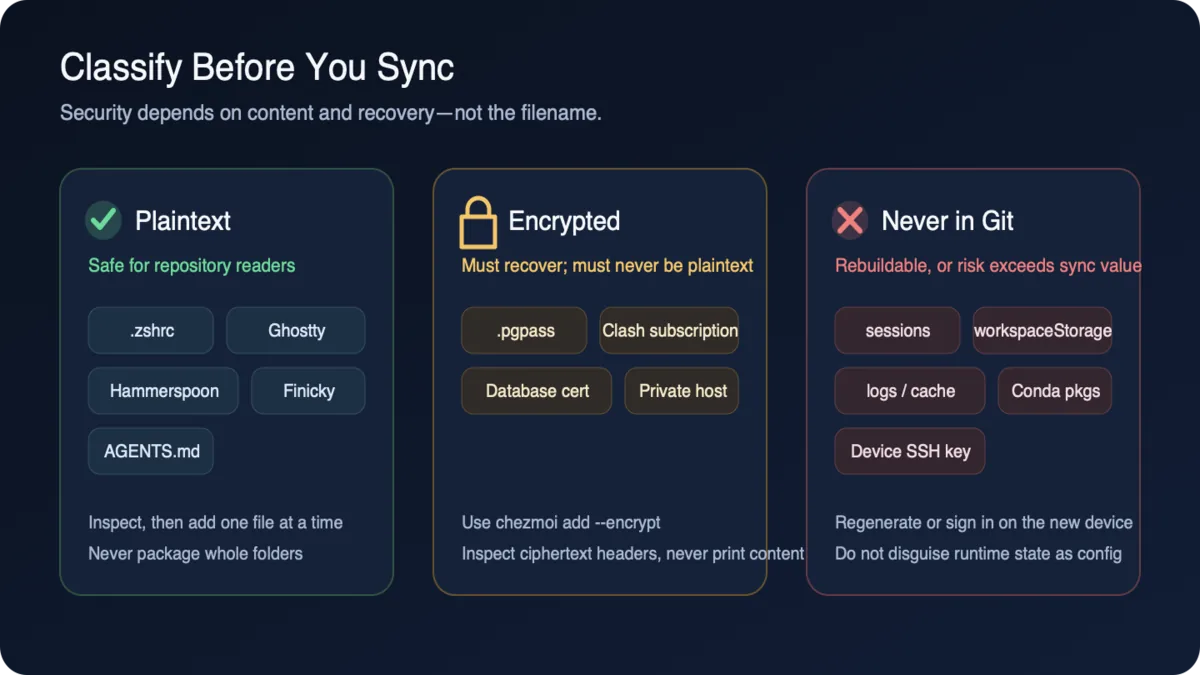
| Type | Examples | Treatment |
|---|---|---|
| Plaintext configuration | .zshrc, Ghostty, Hammerspoon, Finicky, Git ignore | Manage as plaintext in Git |
| Application settings | Cursor, VS Code, Codex, Claude Code, pi | Manage only explicit configuration, rules, skills, and hooks |
| Declarative state | Brew, global pnpm packages, Node versions, Conda environments | Store a manifest and rebuild on the target machine |
| Semi-sensitive configuration | SSH hosts, database addresses, Nginx domains | Template or encrypt |
| Credentials | SSH private keys, tokens, passwords, certificates, Clash subscriptions | Prefer keeping them out of the repository; if synchronization is necessary, encrypt with age |
| Runtime data | IDE workspaceStorage, chat history, logs, caches, Conda packages | Do not synchronize |
Several common mistakes:
- synchronize a
Brewfile, not/opt/homebrew/Cellar; - synchronize
.nvmrcand the default Node version, not~/.nvm/versions; - synchronize a manually maintained
environment.yml, not the entire Miniconda environment; - synchronize
~/.ssh/config, but do not synchronize SSH private keys by default; - synchronize Codex/Claude rules and explicit settings, not
auth, sessions, history, or logs; - synchronize a non-sensitive ClashX template, while encrypting subscription URLs, node passwords, and certificates.
3. Install four tools first
This article uses four tools:
chezmoi: computes and applies the desired state of your dotfiles;age: encrypts sensitive files that truly need to enter the repository;gitleaks: scans for common secrets before a commit;gh: signs in to GitHub and accesses private repositories.
1
brew install chezmoi age gitleaks gh
Verify the installation:
1
2
3
4
chezmoi --version
age --version
gitleaks version
gh --version
All four are open-source tools. Git itself does not determine whether a piece of text looks like a token. chezmoi can check once during add, while Gitleaks additionally covers staged changes and the complete Git history. The scanners complement one another, but both are pattern detectors rather than proof that nothing can leak.
4. Secure the key before touching sensitive files
Do not get ahead of yourself here. Create and back up the age identity before letting chezmoi touch any sensitive file. Reversing the order may allow plaintext into the source state; encrypting later only closes the stable door after the horse has bolted.
1. Generate a dedicated age identity
1
2
3
4
mkdir -p "$HOME/.config/chezmoi"
chmod 700 "$HOME/.config/chezmoi"
chezmoi age-keygen --output="$HOME/.config/chezmoi/key.txt"
chmod 600 "$HOME/.config/chezmoi/key.txt"
The command prints a public recipient beginning with age1. It may be public; the identity in key.txt must not be.
Immediately do two things:
- Back up
key.txtto a password manager, encrypted removable storage, or offline recovery media; - Confirm that the recovery copy is readable before continuing.
Never do this:
1
Put the age identity in the same dotfiles repository
That is equivalent to storing the safe and its key together.
2. Configure chezmoi to use age
Create ~/.config/chezmoi/chezmoi.toml:
1
2
3
4
5
6
7
8
encryption = "age"

[age]
    identity = "~/.config/chezmoi/key.txt"
    recipient = "age1-replace-with-the-public-recipient-from-the-previous-command"

[add]
    secrets = "error"
Note that encryption = "age" must be at the top level of the TOML document. recipient is the public key, while identity points to the private-key file that exists only on the local machine. add.secrets = "error" promotes chezmoi’s secret detection for unencrypted additions from its default warning to a hard failure; files explicitly added with --encrypt are not incorrectly blocked by this gate.
5. Start with just one file
1
2
chezmoi init
chezmoi source-path
By default, chezmoi stores the desired state in:
1
~/.local/share/chezmoi
This is not a mirror of $HOME; it is the source state that will eventually enter Git. A simple but useful mindset is: whenever you open it, imagine someone who can read the entire repository sitting beside you. Only content you are willing to show them may remain there.
The local ~/.config/chezmoi/chezmoi.toml is not automatically included in the repository. To give a new device the same non-secret configuration during chezmoi init, create .chezmoi.toml.tmpl at the source-state root:
1
2
3
4
5
6
7
8
encryption = "age"

[age]
    identity = "{{ .chezmoi.homeDir }}/.config/chezmoi/key.txt"
    recipient = "age1-replace-with-your-public-recipient"

[add]
    secrets = "error"
This template contains only the public recipient and identity path, not the age identity itself, so it may enter Git. A new device must restore key.txt from a separate secure location before running chezmoi init.
The basic chezmoi workflow is:
1
2
3
4
5
chezmoi add     Add a target file to the source state
chezmoi edit    Edit the source state
chezmoi diff    Preview changes from apply (may decrypt and display sensitive content)
chezmoi apply   Apply the desired state to $HOME
chezmoi update  Pull remote changes and apply them
For the first run, choose one non-sensitive file such as .zshrc. The goal is not speed, but exercising the shortest add → diff → apply path first:
1
2
3
chezmoi add "$HOME/.zshrc"
chezmoi diff "$HOME/.zshrc"
chezmoi managed
chezmoi diff evaluates templates and decrypts encrypted_ files, so a complete diff may expose passwords in a terminal, pager, screen recording, or Agent log. In everyday use, diff only individual targets already confirmed to be non-sensitive. Do not run a verbose diff across the entire target tree, and never redirect, paste into chat, or save output that might contain secrets. For encrypted files, check only whether the source path contains age ciphertext, then validate the target file separately in a trusted local terminal.
Do not begin with:
1
2
chezmoi add "$HOME/.ssh"
chezmoi add "$HOME/.config"
Large directories usually mix tokens, caches, databases, downloads, and internal application state. Adding one file at a time is the safe default.
6. Put guardrails around the first commit
Everything is still local, so this is the best moment to install defenses. Scanning only after a push is already one step too late, no matter how quickly a leak is detected.
1. Create a shared hook in the repository
Enter the source state:
1
2
chezmoi cd
mkdir -p .githooks
Create .githooks/pre-commit:
1
2
3
4
5
6
7
8
9
#!/bin/sh
set -eu

if ! command -v gitleaks >/dev/null 2>&1; then
  echo "gitleaks is not installed; refusing to commit. Run: brew install gitleaks" >&2
  exit 1
fi

exec gitleaks git --staged --redact
Enable it:
1
2
chmod +x .githooks/pre-commit
git config core.hooksPath .githooks
core.hooksPath is local Git configuration for the current clone and must be set again on each new device. The hook intentionally fails when Gitleaks cannot be found rather than silently allowing the commit.
2. Add ignore rules for the source state itself
.chezmoiignore matches target paths, not source paths. It reduces the risk of accidentally managing files, but cannot stop you from manually copying plaintext into the Git repository.
A conservative starting point:
# Repository files that must not be applied to $HOME
README.md
.githooks/**

# Runtime data that chezmoi must never manage
.codex/sessions/**
.codex/log/**
.claude/history/**
.claude/logs/**

# Do not manage SSH private keys by default
.ssh/id_*
!.ssh/*.pub
Also add .gitignore to prevent common plaintext temporary files from entering the source repository:
.env
.env.*
*.pem
*.key
*.decrypted
gitleaks-report*.json
This is still not a comprehensive secret list. An ordinary config.json, for example, may contain a token, so Gitleaks and manual review remain mandatory.
3. Make the first commit safely
Do not use git add . during the first migration. Inspect and stage each item explicitly:
1
2
3
4
5
git status --short
gitleaks dir . --redact
git add -- dot_zshrc .chezmoi.toml.tmpl .chezmoiignore .gitignore .githooks/pre-commit
git diff --cached --no-ext-diff --text
git commit -m "bootstrap secure chezmoi repository"
Keep every commit on the same path:
1
2
3
4
5
6
7
8
chezmoi add/edit
  → chezmoi status
  → diff only targets confirmed to be non-sensitive
  → gitleaks dir
  → precise git add
  → git diff --cached
  → automatic pre-commit scan
  → commit
7. Three kinds of configuration, three treatments
1. Normal configuration: manage as plaintext after inspection
The following files are usually suitable for plaintext management, but you should still inspect them before adding:
1
2
3
4
5
chezmoi add "$HOME/.zshrc"
chezmoi add "$HOME/.finicky.js"
chezmoi add "$HOME/.hammerspoon/init.lua"
chezmoi add "$HOME/.config/ghostty/config"
chezmoi add "$HOME/.config/git/ignore"
On macOS, IDE configuration is usually stored at:
1
2
3
4
chezmoi add "$HOME/Library/Application Support/Code/User/settings.json"
chezmoi add "$HOME/Library/Application Support/Code/User/keybindings.json"
chezmoi add "$HOME/Library/Application Support/Cursor/User/settings.json"
chezmoi add "$HOME/Library/Application Support/Cursor/User/keybindings.json"
Before adding, search for token, password, secret, and apiKey. Some extensions mix connection information into settings.json; a file is not safe merely because its name is settings.
If an IDE rewrites a file frequently, do not immediately symlink the entire User directory. Manage only stable files first, observe the behavior for a while, then decide whether to use a chezmoi template, modify script, or source symlink.
2. Semi-sensitive configuration: separate structure from concrete values
Take SSH config as an example. The structure may be shareable, while company domains, usernames, and bastion addresses may not belong in plaintext. In that case, store variables in local chezmoi data and generate the target file from a template.
1
2
3
4
Host work-bastion
  HostName {{ .workBastionHost }}
  User {{ .workSshUser }}
  IdentityFile ~/.ssh/work_ed25519
Templates suit configurations with the same structure but different values on each machine. If a variable is itself a password, it must still be read from a password manager or stored encrypted; moving it from one plaintext file to another does not secure it.
3. Sensitive files that must be synchronized: encrypt them on the very first add
chezmoi officially supports --encrypt. A sensitive file must enter the source state through this path the first time:
1
chezmoi add --encrypt "$HOME/.pgpass"
In the source state, it is stored with the encrypted_ attribute and as age ciphertext; chezmoi decrypts it as needed during apply, diff, and edit.
Verify that the original text is absent from the source:
1
2
3
encrypted_source="$(chezmoi source-path "$HOME/.pgpass")"
grep -q '^-----BEGIN AGE ENCRYPTED FILE-----$' "$encrypted_source" \
  && echo "OK: source state stores age ciphertext"
The command checks only the age armor header and does not print the file body, preventing a failed validation from exposing the database password in terminal output or logs.
Encryption support does not mean every secret belongs in the repository. The recommended priority is:
1
2
3
Regenerate per device / retrieve dynamically from a password manager
  > store with age encryption
  > store plaintext in a Private Repo (prohibited)
SSH private keys should especially be generated per device or handled by an SSH Agent or password manager. Do not centralize every identity credential in one repository merely because age is available.
8. Do not migrate everything in one day: use four batches
Only after the guardrails are installed should the actual move begin. Do not try to migrate every configuration in one day: the larger the batch, the harder it is to identify which file or synchronization method caused a failure.
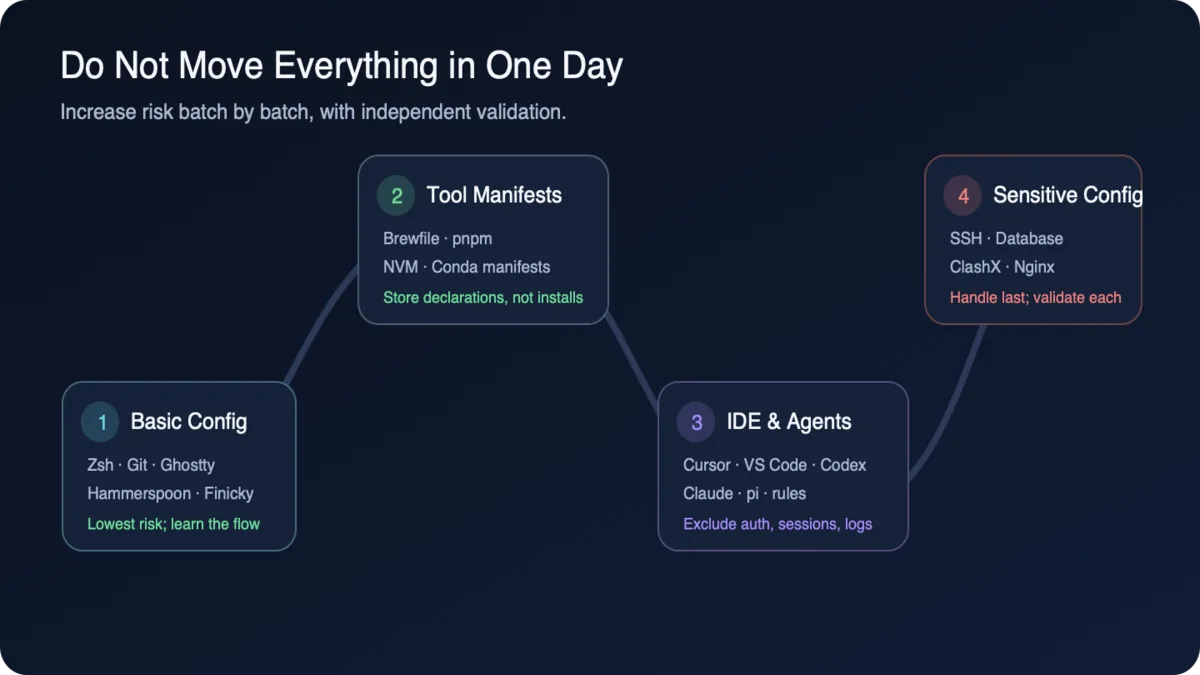
Batch 1: low-risk foundational configuration
1
2
3
4
5
.zshrc / .zprofile
Git config and global ignore
Ghostty
Hammerspoon
Finicky
Acceptance: open a new shell; verify conditional Git identity rules; restart the relevant applications.
Batch 2: declarative tool state
Use a Brewfile for Homebrew:
1
2
brew bundle dump --file="$HOME/Brewfile" --force
chezmoi add "$HOME/Brewfile"
Restore it with:
1
brew bundle --file="$HOME/Brewfile"
Do not copy installation directories for pnpm, NVM, or Conda:
1
2
3
pnpm   → Save the required global package list; pin project versions with packageManager/Corepack
NVM    → Save the default Node version and each project's .nvmrc
Conda  → Save a manually reviewed environment.yml
A complete Conda export often contains platform-specific build numbers and local paths, so it should not become a cross-device specification without review.
Batch 3: IDE and AI tools
1
2
3
4
5
Cursor / VS Code  → settings, keybindings, snippets, and extension lists
Codex             → configuration, AGENTS.md, skills, and rules; exclude auth/session/log
Claude Code       → CLAUDE.md, settings, skills, and hooks; exclude credentials and history
Claude App        → Sync only public, stable, explicit configuration; do not copy all Application Support
pi                → Likewise classify explicit configuration / rules / credentials separately
For cross-tool rules, maintain one authoritative source and project it into each tool:
1
2
3
4
5
6
agents/shared/AGENTS.md
    ├─ project AGENTS.md
    ├─ Cursor .cursor/rules/*.mdc
    ├─ VS Code instructions
    ├─ Codex AGENTS.md
    └─ Claude CLAUDE.md / rules
Do not manage the same settings with chezmoi while also allowing the IDE’s native Sync to overwrite them. Disable the relevant native synchronization category for files managed by dotfiles; native Sync can continue to handle UI State, Profile, or internal application state.
Batch 4: SSH, databases, ClashX, and Nginx
This is the high-risk batch. Handle each item separately:
| Configuration | Recommended method | Acceptance |
|---|---|---|
| SSH config | Template or encrypt | Use ssh -G <host> to inspect the expanded result |
| SSH private key | Generate per device / SSH Agent | Permissions are 0600; test the target connection |
| Database configuration | Template ordinary parameters; read passwords dynamically or encrypt them | Run only a read-only connection test |
| ClashX | Store a non-sensitive skeleton as plaintext; encrypt subscriptions and nodes in full | Confirm the source state contains no URL or password |
| Nginx | Template the configuration | Reload only after nginx -t passes |
Do not mistake database data directories, Nginx runtime files, or Clash caches and logs for configuration that should be synchronized.
9. Create the private repository only after every local check passes
All previous checks happen locally. Only now do we reach GitHub. This order means that even if the remote has no Secret Scanning, we are not placing all our hopes in it without protection.
Sign in to GitHub:
1
2
gh auth login
gh auth setup-git
Create a personal private repository:
1
gh repo create dotfiles --private --source="$(chezmoi source-path)" --remote=origin
Confirm its visibility rather than relying on how the web page appears:
1
gh repo view YOUR_GITHUB_USERNAME/dotfiles --json visibility --jq .visibility
Expected output:
1
PRIVATE
Run the full gate once more before pushing:
1
2
3
4
5
6
7
chezmoi cd
git branch -M main
git status --short
gitleaks git --redact
git log --stat --oneline
git remote -v
git push -u origin main
Remember: running Gitleaks in GitHub Actions detects a problem only after a push. It cannot replace a local pre-commit hook. For secrets, “the remote alerts quickly” still means the secret has reached the remote.
10. On a new Mac: rehearse before writing files for real
The real test of dotfiles is not whether the first machine pushed successfully, but whether a second machine can restore them safely. The new device needs two identities: a GitHub identity to read the repository and an age identity to decrypt ciphertext. They must arrive through separate secure paths.
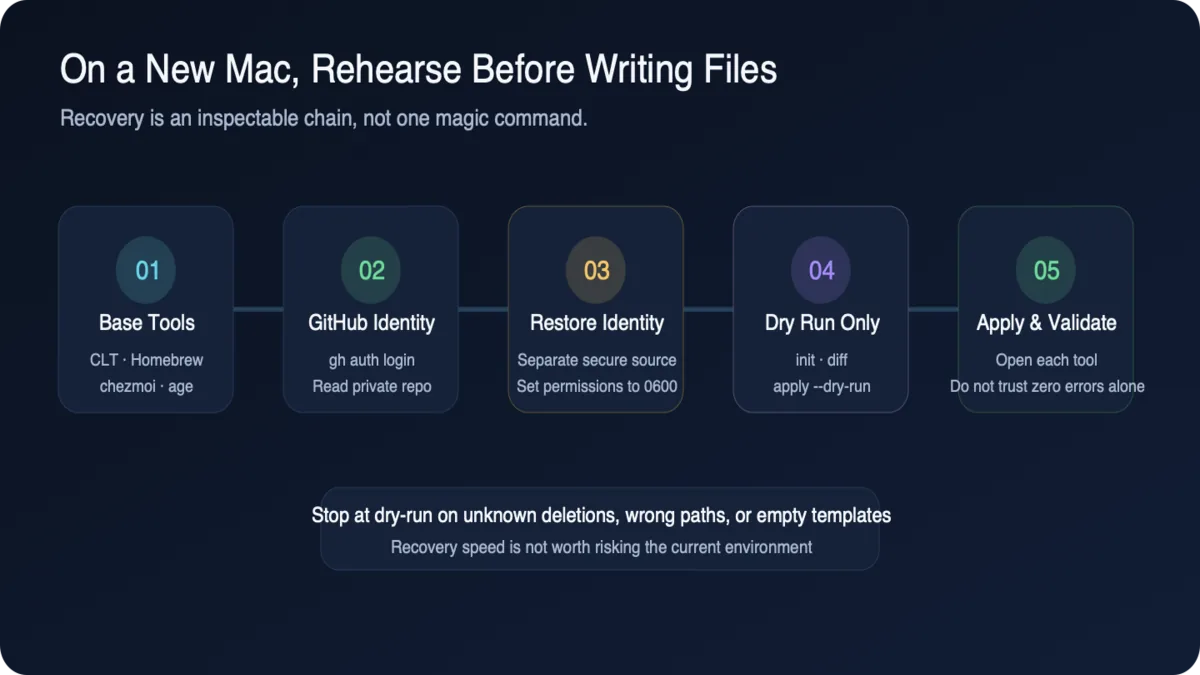
- Sign in to GitHub to read the private repository;
- Restore the age identity from a separate secure location.
Install the tools and sign in:
If this is a newly initialized Mac, first complete the official installation of Xcode Command Line Tools and Homebrew. This tutorial starts once Homebrew is available and does not mix Homebrew’s own bootstrap into the dotfiles recovery chain.
1
2
3
brew install chezmoi age gitleaks gh
gh auth login
gh auth setup-git
Create the identity directory first:
1
2
mkdir -p "$HOME/.config/chezmoi"
chmod 700 "$HOME/.config/chezmoi"
Then restore the age identity from a separate secure location to the same path:
1
~/.config/chezmoi/key.txt
Finally, set its file permissions:
1
chmod 600 "$HOME/.config/chezmoi/key.txt"
Do not use --apply immediately on the first run. Pull, inspect, and then apply:
1
2
3
4
chezmoi init https://github.com/YOUR_GITHUB_USERNAME/dotfiles.git
chezmoi status
chezmoi diff "$HOME/.zshrc"
chezmoi apply --dry-run
--verbose prints file diffs, which may expose secrets from templates or encrypted targets in terminals and logs. Do not use it during a whole-repository restore. First inspect the change scope with status, then diff only individual targets confirmed to be non-sensitive.
Once paths and change scope are correct, apply normal configuration without printing file contents:
1
chezmoi apply
For templates or encrypted targets containing secrets, apply and validate each target separately in a trusted local terminal, without --verbose at any point.
Re-enable the local hook:
1
2
3
chezmoi cd
git config core.hooksPath .githooks
gitleaks git --redact
Finally, validate outcomes item by item instead of treating “the command did not error” as acceptance:
1
2
3
4
5
6
7
8
9
New shell starts normally
Git identity and ignore rules take effect
Ghostty / Hammerspoon / Finicky configuration takes effect
IDE settings, shortcuts, and snippets are correct
AI rules are discoverable by their respective tools
SSH read-only connection test passes
Database read-only connection test passes
nginx -t passes
The source state contains no plaintext secrets
For everyday updates, use:
1
2
3
git -C "$(chezmoi source-path)" pull --ff-only
chezmoi status
chezmoi apply
Inspect source-repository changes and chezmoi status before applying, especially when scripts, deletions, or service configuration are involved. When you need content-level inspection, continue to diff only targets already confirmed to be non-sensitive.
11. If a real leak happens, invalidate the old credential first
Hopefully you never need this section, but if you do, order matters more than speed. The first principle is simple: rotate the credential before cleaning history. Deleting the file may look like the most direct response, but it does not stop someone from using a credential they have already seen.
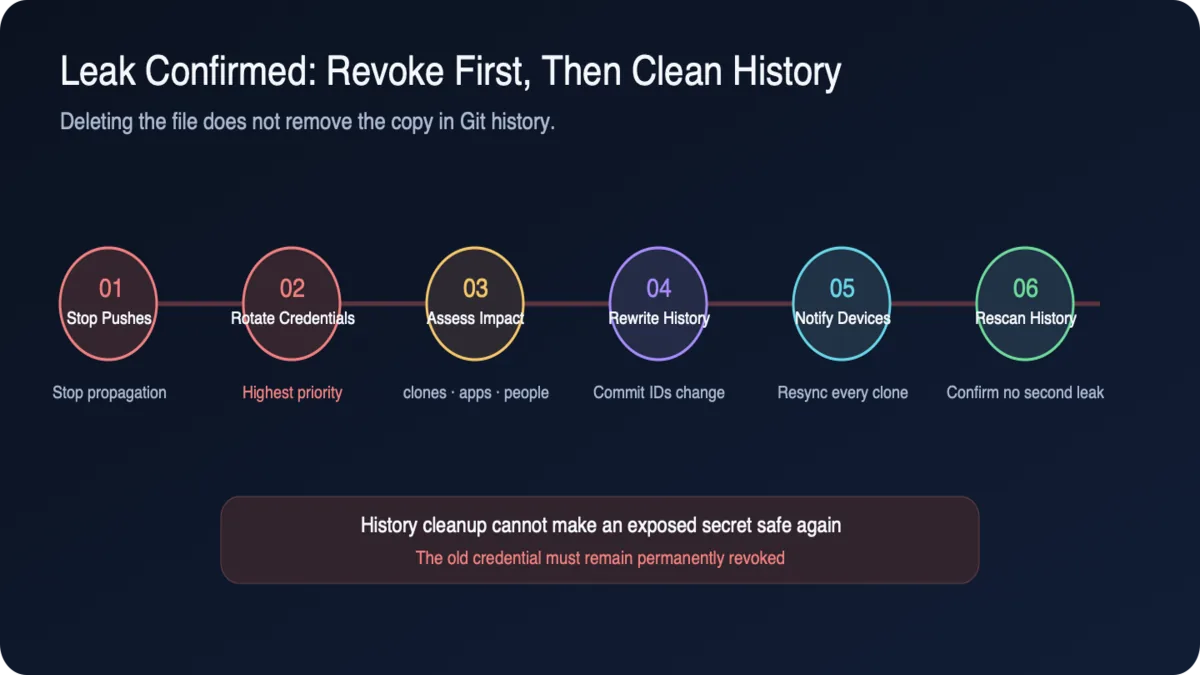
After invalidating the credential, identify which clones, GitHub Apps, collaborators, and automations may have received a copy. Then convert the current version to a template or ciphertext, use a tool such as git-filter-repo to clean the history, notify every device to resynchronize, and finally scan the entire history to confirm there is no second occurrence.
An ordinary commit that deletes the file is not enough; the old content remains in history. Even after rewriting history, treat the original credential as permanently compromised and revoked. History cleanup cannot make an already-read secret “safe again.”
Rewriting history changes commit IDs and affects every clone. Do not force-push without understanding the repository’s consumers. A personal dotfiles repository usually has few consumers, but you should still inventory devices and automations first.
12. Do not measure completion by file count
It is normal for a newly created repository to contain only a few files. The value of dotfiles is not how complete the directory appears, but whether you genuinely trust yourself to rehearse and apply it on a new machine—and know that no plaintext secret ever entered its history. As configurations stabilize batch by batch, the repository will naturally grow into logical areas like these:
1
2
3
4
5
6
7
8
9
10
11
12
13
14
15
16
17
18
19
20
21
22
23
24
25
dotfiles/
├── shell/
├── editors/
│   ├── common/
│   ├── vscode/
│   └── cursor/
├── agents/
│   ├── shared/
│   ├── codex/
│   ├── claude/
│   └── pi/
├── git/
├── ssh/
├── database/
├── ghostty/
├── hammerspoon/
├── finicky/
├── clashx/
├── nginx/
├── manifests/
│   ├── Brewfile
│   ├── pnpm-global.txt
│   ├── node-versions
│   └── conda/
└── encrypted secrets
The actual chezmoi source state encodes attributes such as dot_, private_, encrypted_, and .tmpl; there is no need to optimize for a pretty directory on day one. The right evolution is:
1
2
3
4
5
One low-risk file
  → one batch of verifiable configuration
  → declarative software manifests
  → IDE and AI tools
  → sensitive configuration last
The true completion criterion is not “the repository contains many files,” but this:
On a clean device after the foundational tool bootstrap, GitHub identity and a separately stored age identity are sufficient to preview and rebuild the required configuration, and no version in the repository’s history contains plaintext secrets.